
Using Nt GUI
How to open a window, paint on it and handle input with Nt GUI.
Nt GUI follows the layering of Qt GUI. An application creates a QGuiApplication, which loads a platform integration. The platform creates the native windows, delivers input, and puts the pixels of a window on the screen. Application code only sees QWindow, QScreen, the events in qevent.h and QPainter.
A Window You Paint On
Subclass QRasterWindow and paint in paintEvent() with a QPainter that paints on the window itself. Call update() to ask for a repaint; the request is coalesced and delivered from the event loop.
class HelloWindow : public QRasterWindow {
public:
    HelloWindow() {
        setTitle("Hello, Nt GUI");
        resize(480, 320);
    }

protected:
    void paintEvent(QPaintEvent *) override {
        QPainter painter(this);
        painter.fillRect(0, 0, width(), height(), QColor("#f4f1ea"));

        painter.setPen(QColor("#d8d2c4"));
        for (int x = 0; x < width(); x += 40)
            painter.drawLine(x, 0, x, height());
        for (int y = 0; y < height(); y += 40)
            painter.drawLine(0, y, width(), y);

        painter.setPen(QPen(QBrush(QColor("#2b2b2b")), 3));
        painter.setBrush(m_colors[m_color]);
        painter.drawEllipse(m_mouse.x() - 40, m_mouse.y() - 40, 80, 80);

        QFont font("Sans Serif", 14);
        font.setBold(true);
        painter.setFont(font);
        painter.setPen(QColor("#2b2b2b"));
        painter.drawText(QRect(0, 12, width(), 30), Qt::AlignHCenter, "Hello, Nt GUI");
        font.setBold(false);
        font.setPointSize(10);
        painter.setFont(font);
        painter.drawText(QRect(12, 0, width() - 24, height() - 10), Qt::AlignLeft | Qt::AlignBottom,
                         "Move the mouse, click to change the color, press Escape to quit.");
    }

    void mouseMoveEvent(QMouseEvent *event) override {
        m_mouse = event->pos();
        update();
    }

    void mousePressEvent(QMouseEvent *event) override {
        m_mouse = event->pos();
        m_color = (m_color + 1) % 3;
        update();
    }

    void keyPressEvent(QKeyEvent *event) override {
        if (event->key() == Qt::Key_Escape)
            close();
    }

private:
    QPoint m_mouse{240, 160};
    int m_color = 0;
    const QColor m_colors[3] = {QColor("#e4572e"), QColor("#29a35a"), QColor("#3a7bd5")};
};
The main() function creates the application object, then the window:
int main(int argc, char *argv[])
{
    QGuiApplication app(argc, argv);
    HelloWindow window;
    window.show();
    return app.exec();
}
The hello_window example is this program. Link it with Nt::Gui:
find_package(Nt6 REQUIRED)
add_executable(hello_window main.cpp)
target_link_libraries(hello_window PRIVATE Nt::Gui)
Platforms
Nt GUI has two platforms:
xcbtalks to an X11 server, including XWayland on a Wayland desktop. It needs the XCB library at build time; without it, Nt GUI builds with theoffscreenplatform only.offscreenhas no display. Windows keep their pixels in memory. The tests of Nt use it, and so can yours.
The platform is the value of the -platform command line option, or else of the QT_QPA_PLATFORM environment variable. Without either, Nt GUI uses xcb when DISPLAY is set, and offscreen otherwise, with a message.
Painting Without a Window
QImage is a paint device, so a QPainter draws on an image as it does on a window. This makes drawing code testable without a display:
QImage image(100, 100, QImage::Format_ARGB32_Premultiplied);
image.fill(Qt::white);
QPainter painter(&image);
painter.setPen(QPen(Qt::black, 2));
painter.drawEllipse(10, 10, 80, 80);
Paths, Gradients and Transformations
QPainter draws paths of lines and Bezier curves (QPainterPath), polygons, arcs, pies and chords, with real coordinates, through a transformation (translate(), scale(), rotate(), shear(), QTransform). Pens have cap and join styles and dashes; brushes have linear, radial and conical gradients. With the Antialiasing render hint the edges are smooth:
QPainterPath petal;
petal.moveTo(0, 0);
petal.cubicTo(30, -40, 90, -40, 120, 0);
petal.cubicTo(90, 40, 30, 40, 0, 0);

painter.setRenderHint(QPainter::Antialiasing);
painter.translate(size.width() / 2, size.height() / 2);
painter.scale(size.height() / 300, size.height() / 300);
painter.rotate(phase);
for (int i = 0; i < 12; ++i) {
    QRadialGradient shade(QPointF(60, 0), 60);
    shade.setColorAt(0, QColor::fromHsv(i * 30, 160, 255));
    shade.setColorAt(1, QColor::fromHsv(i * 30, 255, 170));
    painter.setPen(QPen(QColor(60, 30, 60), 1.5));
    painter.setBrush(shade);
    painter.drawPath(petal);
    painter.rotate(30);
}
painter.setBrush(QColor(250, 210, 60));
painter.drawEllipse(QPointF(0, 0), 22, 22);
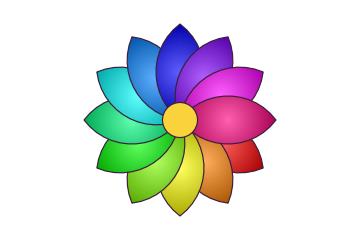
The rasterizer is software: shapes become polygons, whose coverage of each pixel is computed exactly from their edges. Integer shapes drawn without antialiasing or a transformation stay on whole pixels, as before.
The painting example shows the scenes of these pages in a window, animated, with the frame rate in its title. painting --bench draws each scene on an 800 by 600 image and prints the time per frame, and painting --write dir writes the pictures.
Image Files
QImage and QPixmap load and save PNG, BMP and JPEG files. The format of a file is found from its contents when it is loaded and from the suffix of its name when it is saved (or from the format argument):
QImage image("photo.jpg");
if (!image.isNull())
    image.save("photo.png");
QPixmap icon(":/icons/open.png");
PNG needs zlib and JPEG needs libjpeg; a build without one of them cannot read or write that format. Files are limited to 256 MiB of pixels.
Drawing Text
A QFont names a family, size and weight. QPainter::drawText() draws a string at a baseline position or inside a rectangle with alignment and word wrapping, and QFontMetrics measures it:
QPainter painter(this);
painter.setFont(QFont("Sans Serif", 12));
painter.drawText(QRect(10, 10, 200, 60), Qt::AlignCenter | Qt::TextWordWrap, "Some text");
QFontMetrics fm(painter.font());
int width = fm.horizontalAdvance("Some text");
Nt looks fonts up with fontconfig and rasterizes them with FreeType; both are needed when Nt is built, or text has fixed metrics and does not draw. Sizes in points are converted to pixels at 96 dots per inch.
Rich Text
A QTextDocument holds text with formats: paragraphs with their alignment and margins, and parts of their text with a font, a size, a color or a link. It reads a subset of HTML, breaks its lines for a width, and draws itself with a painter:
QTextDocument document;
document.setDefaultFont(painter.font());
document.setHtml("<h3>Status</h3><p>Disk <b>87 %</b> full, see <a href=\"disk\">details</a>.</p>");
document.setTextWidth(240);
document.drawContents(&painter);
QString link = document.documentLayout()->anchorAt(mousePosition);
QTextLayout does the same for one paragraph, line by line, for code that places its lines itself. QLabel and QTextEdit of Nt Widgets show rich text through a QTextDocument.
Screens, Scale and Color Scheme
A screen has a device pixel ratio, QScreen::devicePixelRatio(): the number of pixels of the screen that one unit of window coordinates covers. A window, its events and its QPainter work in those units, and the painter scales what it draws, so an application written for an ordinary screen is the right size on a high-resolution one. On the xcb platform the ratio comes from the Xft.dpi resource of the desktop (192 dots per inch is a ratio of 2), or from the QT_SCALE_FACTOR environment variable. A QImage has a ratio of its own, set with QImage::setDevicePixelRatio(), for painting at the resolution of the screen.
The color scheme of the desktop, light or dark, is QStyleHints::colorScheme(), which QGuiApplication::styleHints() returns. On the xcb platform it is read from the desktop portal and followed as it changes; connect to QStyleHints::colorSchemeChanged() to react, or call QStyleHints::setColorScheme() to choose one yourself.
Widgets on Nt GUI
Nt Widgets is built on the classes of this page: the widgets of a window are painted by a QPainter into the backing store of one QWindow, and the events of the window are sent to the widgets. The hello_widgets example, here on a screen with twice the usual pixels in the dark and the light color scheme, shows every widget that Nt has on the pages of a tab widget:
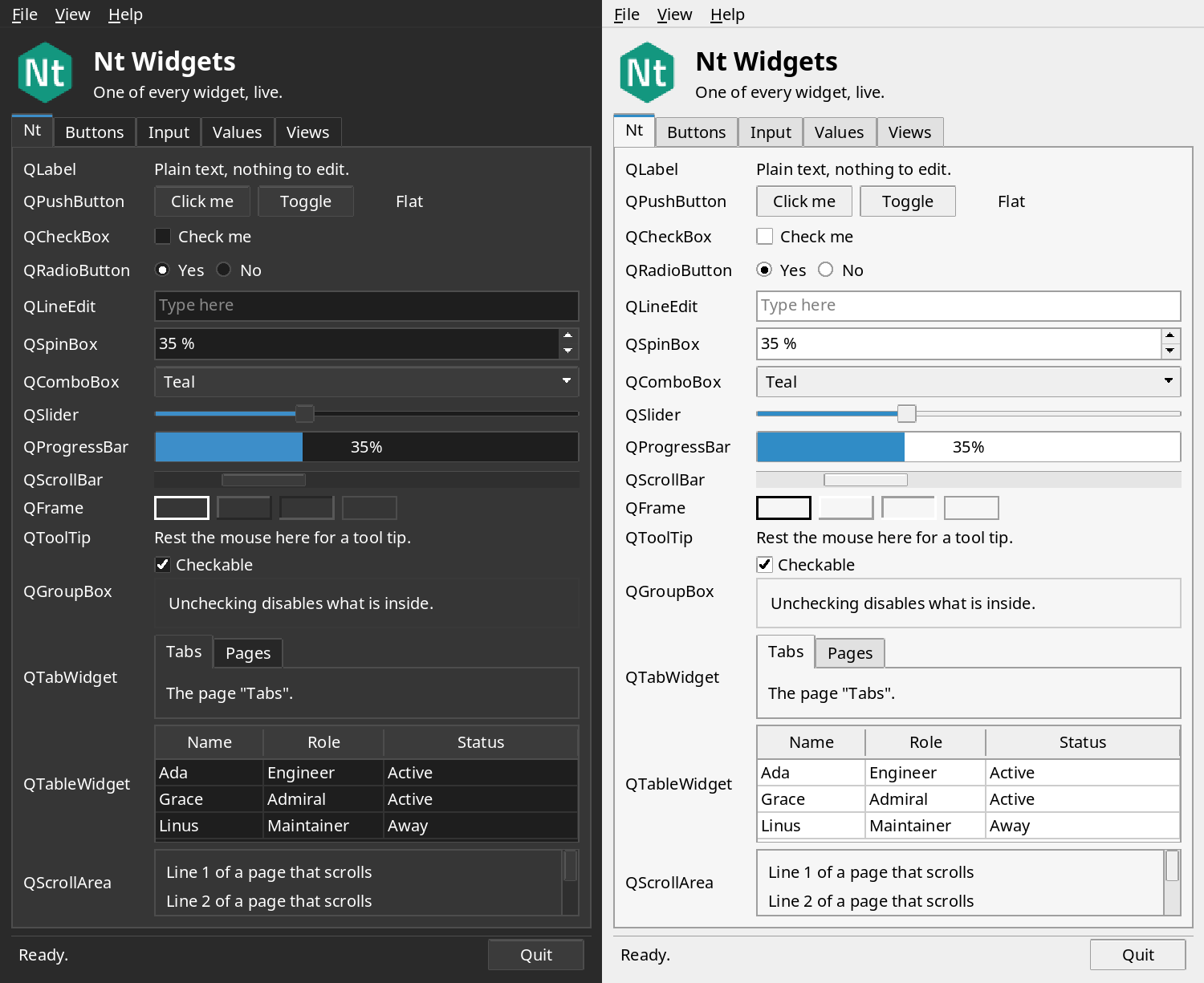
See Using Nt Widgets for the widgets, layouts and styles.
What Is Not There Yet
Windows paint in software unless they render with OpenGL, through EGL (see Using Nt OpenGL); there is no Vulkan, Metal, Direct3D or QRhi back end. Text is drawn glyph by glyph, upright, without shaping, kerning or font fallback, so complex scripts and emoji do not display. Widgets and layouts are in Nt Widgets. There is no clipboard, drag and drop or input methods; a QCursor has one of the standard shapes. The xcb platform shows one screen, the whole X desktop, and copies the window contents to the server with PutImage. Each class lists its own limits in its Differences from Qt section.
See also QGuiApplication, QWindow, QRasterWindow, QPainter, QImage, QStyleHints, QScreen and Using Nt OpenGL.