
Using Nt Widgets
How to build a user interface from widgets and layouts.
A user interface is a tree of widgets. The widget without a parent is a window; its children are drawn inside it. Layouts place the children, so that a window can be resized without arranging every widget by hand, and a QStyle draws the standard controls.
A First Form
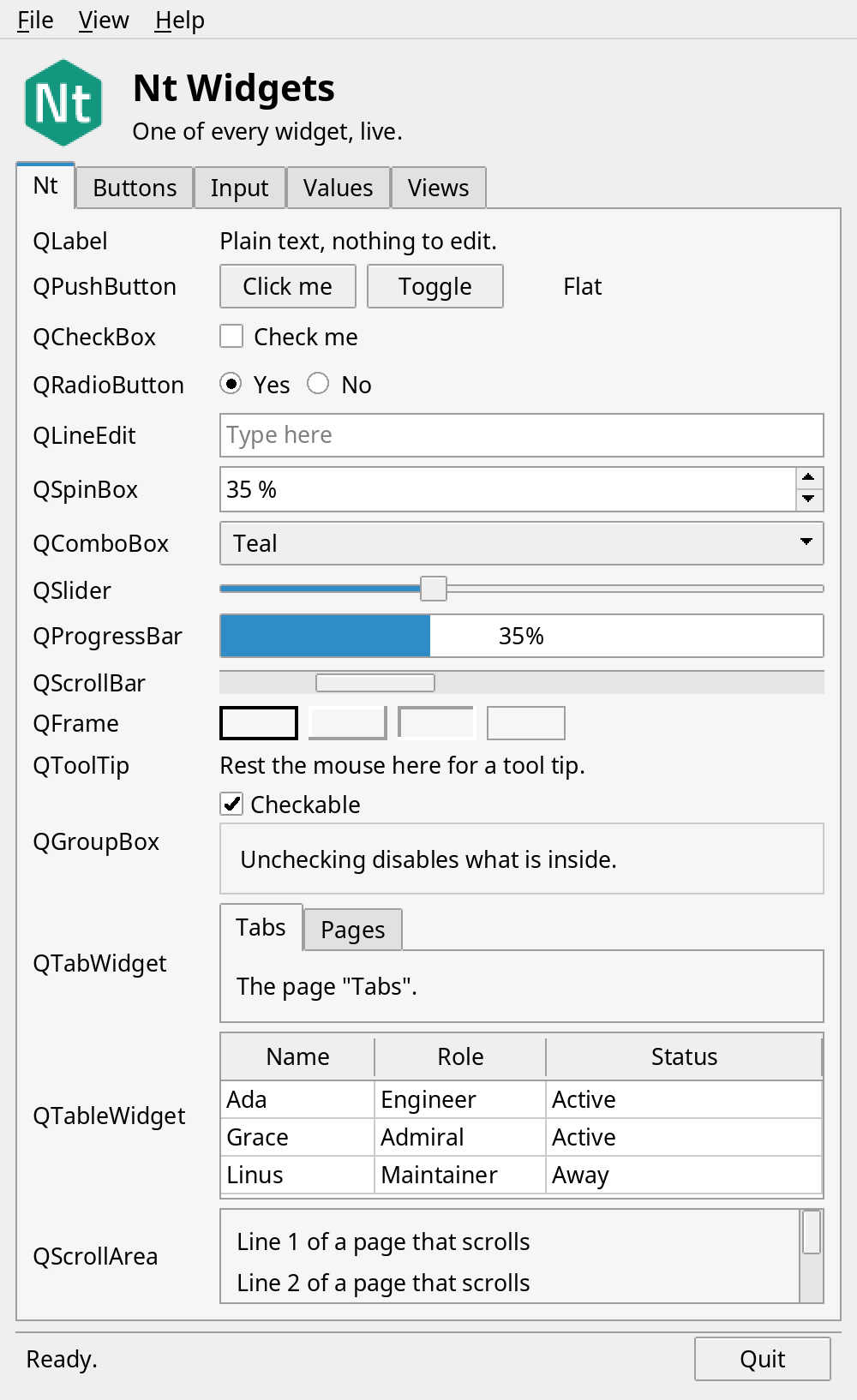
Create a QApplication, a top-level QWidget, the widgets, and put them in layouts. Connect to the signals of the controls. The hello_widgets example has the Nt logo and one of every widget, on the pages of a QTabWidget. The first page, Nt, is a showcase: one row for each widget that Nt has, with the name of its class and a live example. The pages after it group the widgets as an application would: buttons, check boxes and radio buttons in a QGroupBox; line edits, a spin box and a combo box; sliders and a progress bar that show the same value; and, on the Views page, a QTableWidget of people with a QScrollArea that holds a form made with a QGridLayout. Each page is a function that builds a widget with a layout:
// A label and a widget side by side, with the labels of all rows of a page the same width.
static QHBoxLayout *row(const QString &text, QWidget *widget, QWidget *page, int labelWidth = 90) {
    auto *label = new QLabel(text, page);
    label->setFixedWidth(labelWidth);
    auto *layout = new QHBoxLayout;
    layout->addWidget(label);
    layout->addWidget(widget, 1);
    return layout;
}

// The widgets of Nt, one row each: the name of the class and a live example. Everything reports to the status line.
static QWidget *showcasePage(QLabel *status) {
    auto *page = new QWidget;
    auto *layout = new QVBoxLayout(page);
    layout->setSpacing(5);
    const int names = 104;

    auto *label = new QLabel("Plain text, nothing to edit.", page);
    layout->addLayout(row("QLabel", label, page, names));

    auto *buttons = new QWidget(page);
    auto *buttonsLayout = new QHBoxLayout(buttons);
    buttonsLayout->setContentsMargins(0, 0, 0, 0);
    auto *push = new QPushButton("Click me", buttons);
    push->setToolTip("A push button: click it");
    auto *toggle = new QPushButton("Toggle", buttons);
    toggle->setCheckable(true);
    auto *flat = new QPushButton("Flat", buttons);
    flat->setFlat(true);
    buttonsLayout->addWidget(push);
    buttonsLayout->addWidget(toggle);
    buttonsLayout->addWidget(flat);
    buttonsLayout->addStretch();
    layout->addLayout(row("QPushButton", buttons, page, names));
    int clicks = 0;
    QObject::connect(push, &QPushButton::clicked,
                     [=]() mutable { status->setText(QString("Clicked %1 times.").arg(++clicks)); });
    QObject::connect(toggle, &QPushButton::toggled,
                     [=](bool on) { status->setText(on ? "Toggled on." : "Toggled off."); });

    auto *check = new QCheckBox("Check me", page);
    layout->addLayout(row("QCheckBox", check, page, names));
    QObject::connect(check, &QCheckBox::toggled, [=](bool on) { status->setText(on ? "Checked." : "Unchecked."); });

    // Radio buttons with the same parent are exclusive, so they get a widget of their own.
    auto *radios = new QWidget(page);
    auto *radiosLayout = new QHBoxLayout(radios);
    radiosLayout->setContentsMargins(0, 0, 0, 0);
    auto *yes = new QRadioButton("Yes", radios);
    auto *no = new QRadioButton("No", radios);
    yes->setChecked(true);
    radiosLayout->addWidget(yes);
    radiosLayout->addWidget(no);
    radiosLayout->addStretch();
    layout->addLayout(row("QRadioButton", radios, page, names));
    for (QRadioButton *choice : {yes, no})
        QObject::connect(choice, &QRadioButton::toggled, [=](bool on) {
            if (on)
                status->setText("Chose " + choice->text() + ".");
        });

    auto *edit = new QLineEdit(page);
    edit->setPlaceholderText("Type here");
    edit->setToolTip("A line edit: type some text");
    layout->addLayout(row("QLineEdit", edit, page, names));
    QObject::connect(edit, &QLineEdit::textChanged, [=](const QString &text) { status->setText("Text: " + text); });

    auto *spin = new QSpinBox(page);
    spin->setRange(0, 100);
    spin->setValue(35);
    spin->setSuffix(" %");
    layout->addLayout(row("QSpinBox", spin, page, names));

    auto *combo = new QComboBox(page);
    combo->addItems({"Teal", "Orange", "Green", "Purple"});
    layout->addLayout(row("QComboBox", combo, page, names));
    QObject::connect(combo, &QComboBox::currentIndexChanged,
                     [=](int) { status->setText("Chose " + combo->currentText() + "."); });

    auto *slider = new QSlider(Qt::Horizontal, page);
    slider->setRange(0, 100);
    slider->setValue(35);
    layout->addLayout(row("QSlider", slider, page, names));

    auto *bar = new QProgressBar(page);
    bar->setValue(35);
    layout->addLayout(row("QProgressBar", bar, page, names));
    // The spin box, the slider and the progress bar show one value; setValue() does nothing for the same value.
    QObject::connect(slider, &QSlider::valueChanged, spin, &QSpinBox::setValue);
    QObject::connect(slider, &QSlider::valueChanged, bar, &QProgressBar::setValue);
    QObject::connect(spin, &QSpinBox::valueChanged, slider, &QSlider::setValue);

    auto *scrollBar = new QScrollBar(Qt::Horizontal, page);
    scrollBar->setRange(0, 100);
    scrollBar->setPageStep(25);
    scrollBar->setValue(20);
    layout->addLayout(row("QScrollBar", scrollBar, page, names));
    QObject::connect(scrollBar, &QScrollBar::valueChanged,
                     [=](int value) { status->setText(QString("Scrolled to %1.").arg(value)); });

    auto *frames = new QWidget(page);
    auto *framesLayout = new QHBoxLayout(frames);
    framesLayout->setContentsMargins(0, 0, 0, 0);
    for (int style : {QFrame::Box | QFrame::Plain, QFrame::Panel | QFrame::Raised, QFrame::Panel | QFrame::Sunken,
                      QFrame::StyledPanel | QFrame::Sunken}) {
        auto *frame = new QFrame(frames);
        frame->setFrameStyle(style);
        frame->setLineWidth(2);
        frame->setFixedSize(46, 20);
        framesLayout->addWidget(frame);
    }
    framesLayout->addStretch();
    layout->addLayout(row("QFrame", frames, page, names));

    auto *tip = new QLabel("Rest the mouse here for a tool tip.", page);
    tip->setToolTip("A tool tip, from QWidget::setToolTip()");
    layout->addLayout(row("QToolTip", tip, page, names));

    auto *group = new QGroupBox("Checkable", page);
    group->setCheckable(true);
    auto *groupLayout = new QHBoxLayout(group);
    groupLayout->addWidget(new QLabel("Unchecking disables what is inside.", group));
    layout->addLayout(row("QGroupBox", group, page, names));

    auto *tabs = new QTabWidget(page);
    for (const char *name : {"Tabs", "Pages"}) {
        auto *inner = new QWidget;
        auto *innerLayout = new QVBoxLayout(inner);
        innerLayout->addWidget(new QLabel(QString("The page \"%1\".").arg(name), inner));
        tabs->addTab(inner, name);
    }
    tabs->setFixedHeight(70);
    layout->addLayout(row("QTabWidget", tabs, page, names));

    // A table that is small enough to leave the rest of the page in view: the rows are low and it has no row headers.
    auto *table = new QTableWidget(3, 3, page);
    table->setHorizontalHeaderLabels({"Name", "Role", "Status"});
    table->verticalHeader()->hide();
    table->horizontalHeader()->setStretchLastSection(true);
    const char *staff[][3] = {{"Ada", "Engineer", "Active"}, {"Grace", "Admiral", "Active"}, {"Linus", "Maintainer", "Away"}};
    for (int r = 0; r < 3; ++r) {
        table->setRowHeight(r, 22);
        for (int c = 0; c < 3; ++c)
            table->setItem(r, c, new QTableWidgetItem(staff[r][c]));
    }
    table->setColumnWidth(0, 90);
    table->setColumnWidth(1, 100);
    table->setFixedHeight(table->horizontalHeader()->sizeHint().height() + 3 * 22 + 4);
    layout->addLayout(row("QTableWidget", table, page, names));
    QObject::connect(table, &QTableWidget::cellClicked, [=](int r, int c) {
        status->setText(QString("Cell %1, %2: %3").arg(r).arg(c).arg(table->item(r, c)->text()));
    });

    // A tree with columns: the branches open and close, and a click on the header sorts the items.
    auto *tree = new QTreeWidget(page);
    tree->setColumnCount(2);
    tree->setHeaderLabels({"Item", "Kind"});
    tree->setSortingEnabled(true);
    auto *core = new QTreeWidgetItem(tree, QStringList{"NtCore", "Module"});
    for (const char *name : {"QObject", "QString", "QList"})
        new QTreeWidgetItem(core, QStringList{name, "Class"});
    auto *widgets = new QTreeWidgetItem(tree, QStringList{"NtWidgets", "Module"});
    for (const char *name : {"QTreeWidget", "QTableWidget"})
        new QTreeWidgetItem(widgets, QStringList{name, "Class"});
    core->setExpanded(true);
    tree->setFixedHeight(96);
    layout->addLayout(row("QTreeWidget", tree, page, names));
    QObject::connect(tree, &QTreeWidget::itemClicked, [=](QTreeWidgetItem *item, int column) {
        status->setText(QString("Tree: %1 (%2)").arg(item->text(0), item->text(column == 0 ? 1 : column)));
    });

    auto *area = new QScrollArea(page);
    auto *areaPage = new QWidget;
    auto *areaLayout = new QVBoxLayout(areaPage);
    for (int i = 1; i <= 6; ++i)
        areaLayout->addWidget(new QLabel(QString("Line %1 of a page that scrolls").arg(i), areaPage));
    area->setWidget(areaPage);
    area->setWidgetResizable(true);
    area->setFixedHeight(56);
    layout->addLayout(row("QScrollArea", area, page, names));
    layout->addStretch();
    return page;
}

// Buttons, check boxes and radio buttons.
static QWidget *buttonsPage(QLabel *status) {
    auto *page = new QWidget;
    auto *layout = new QVBoxLayout(page);

    auto *buttons = new QHBoxLayout;
    auto *button = new QPushButton("Click me", page);
    auto *toggle = new QPushButton("Toggle", page);
    toggle->setCheckable(true);
    auto *flat = new QPushButton("Flat", page);
    flat->setFlat(true);
    buttons->addWidget(button);
    buttons->addWidget(toggle);
    buttons->addWidget(flat);
    buttons->addSpacing(12);
    auto *tool = new QToolButton(page);
    tool->setText("Tool");
    tool->setCheckable(true);
    buttons->addWidget(tool);
    for (Qt::ArrowType type : {Qt::LeftArrow, Qt::RightArrow}) {
        auto *arrow = new QToolButton(page);
        arrow->setArrowType(type);
        arrow->setAutoRaise(true);
        buttons->addWidget(arrow);
        QObject::connect(arrow, &QToolButton::clicked, [=] {
            status->setText(type == Qt::LeftArrow ? "Tool button: left." : "Tool button: right.");
        });
    }
    buttons->addStretch();
    layout->addLayout(buttons);

    auto *clicks = new QLabel("The button was clicked 0 times.", page);
    auto *shout = new QCheckBox("Shout", page);
    auto *enabled = new QCheckBox("Toggle button enabled", page);
    enabled->setChecked(true);
    layout->addWidget(clicks);
    layout->addWidget(shout);
    layout->addWidget(enabled);

    auto *group = new QGroupBox("Size", page);
    auto *groupLayout = new QHBoxLayout(group);
    auto *small = new QRadioButton("Small", group);
    auto *medium = new QRadioButton("Medium", group);
    auto *large = new QRadioButton("Large", group);
    medium->setChecked(true);
    groupLayout->addWidget(small);
    groupLayout->addWidget(medium);
    groupLayout->addWidget(large);
    groupLayout->addStretch();
    layout->addWidget(group);

    // A stacked widget shows the page of the chosen size, and only that one.
    auto *details = new QStackedWidget(page);
    const char *sizes[] = {"Small: a size that is easy to carry.", "Medium: the size that most people take.",
                           "Large: a size with room for everything."};
    for (const char *text : sizes)
        details->addWidget(new QLabel(text, details));
    details->setCurrentIndex(1);
    details->setSizePolicy(QSizePolicy::Preferred, QSizePolicy::Maximum);
    layout->addWidget(details);
    int index = 0;
    for (QRadioButton *choice : {small, medium, large}) {
        const int stackIndex = index++;
        QObject::connect(choice, &QRadioButton::toggled, [=](bool on) {
            if (on)
                details->setCurrentIndex(stackIndex);
        });
    }
    layout->addStretch();

    int count = 0;
    QObject::connect(button, &QPushButton::clicked, [=]() mutable {
        const QString text = QString("The button was clicked %1 times.").arg(++count);
        clicks->setText(shout->isChecked() ? text.toUpper() : text);
    });
    QObject::connect(enabled, &QCheckBox::toggled, toggle, &QPushButton::setEnabled);
    QObject::connect(toggle, &QPushButton::toggled,
                     [=](bool on) { status->setText(on ? "Toggled on." : "Toggled off."); });
    for (QRadioButton *choice : {small, medium, large})
        QObject::connect(choice, &QRadioButton::toggled, [=](bool on) {
            if (on)
                status->setText("Size: " + choice->text());
        });
    return page;
}

// Text and numbers to type, and a list to choose from.
static QWidget *inputPage(QLabel *status) {
    auto *page = new QWidget;
    auto *layout = new QVBoxLayout(page);

    auto *name = new QLineEdit(page);
    name->setPlaceholderText("Your name");
    auto *password = new QLineEdit(page);
    password->setEchoMode(QLineEdit::Password);
    password->setText("secret");
    auto *age = new QSpinBox(page);
    age->setRange(0, 120);
    age->setValue(30);
    age->setSuffix(" years");
    auto *color = new QComboBox(page);
    color->addItems({"Teal", "Orange", "Green", "Purple", "Yellow", "Pink"});
    auto *greeting = new QLabel("Type a name.", page);

    // A QFormLayout lines up the fields, and the labels in front of them.
    auto *form = new QFormLayout;
    form->addRow("Name", name);
    form->addRow("Password", password);
    form->addRow("Age", age);
    auto *notes = new QPlainTextEdit(page);
    notes->setPlaceholderText("Notes of many lines");
    notes->setFixedHeight(70);
    form->addRow("Notes", notes);
    form->addRow("Color", color);
    layout->addLayout(form);
    layout->addSpacing(6);
    layout->addWidget(greeting);
    layout->addStretch();

    QObject::connect(name, &QLineEdit::textChanged, [=](const QString &text) {
        greeting->setText(text.isEmpty() ? "Type a name." : "Hello, " + text + "!");
    });
    QObject::connect(name, &QLineEdit::returnPressed, [=] { status->setText("Name: " + name->text()); });
    QObject::connect(notes, &QPlainTextEdit::textChanged,
                     [=] { status->setText(QString("Notes: %1 lines.").arg(notes->blockCount())); });
    QObject::connect(age, &QSpinBox::valueChanged, [=](int value) { status->setText(QString("Age: %1").arg(value)); });
    QObject::connect(color, &QComboBox::currentIndexChanged,
                     [=](int) { status->setText("Color: " + color->currentText()); });
    return page;
}

// A slider, a vertical slider and a progress bar that show the same value.
static QWidget *valuesPage(QLabel *status) {
    auto *page = new QWidget;
    auto *layout = new QHBoxLayout(page);
    auto *left = new QVBoxLayout;

    auto *slider = new QSlider(Qt::Horizontal, page);
    slider->setRange(0, 100);
    slider->setValue(35);
    auto *bar = new QProgressBar(page);
    bar->setValue(35);
    auto *spin = new QSpinBox(page);
    spin->setRange(0, 100);
    spin->setValue(35);
    spin->setSuffix(" %");
    auto *hint = new QLabel("Drag a slider, click next to its handle, or use the arrow keys.", page);

    left->addLayout(row("Slider", slider, page));
    left->addLayout(row("Progress", bar, page));
    left->addLayout(row("Spin box", spin, page));
    left->addWidget(hint);

    // A dial and a seven-segment display for the same value.
    auto *dial = new QDial(page);
    dial->setRange(0, 100);
    dial->setValue(35);
    dial->setNotchesVisible(true);
    dial->setMaximumSize(110, 110);
    auto *lcd = new QLCDNumber(3, page);
    lcd->setSegmentStyle(QLCDNumber::Flat);
    lcd->display(35);
    lcd->setMinimumHeight(48);
    auto *meter = new QHBoxLayout;
    meter->addWidget(dial);
    meter->addWidget(lcd, 1);
    left->addLayout(meter);
    left->addStretch();
    auto *tall = new QSlider(Qt::Vertical, page);
    tall->setRange(0, 100);
    tall->setValue(35);
    layout->addLayout(left, 1);
    layout->addWidget(tall);

    // Each control sets the others; setValue() does nothing when the value is the same, so there is no loop.
    for (QSlider *s : {slider, tall})
        QObject::connect(s, &QSlider::valueChanged, [=](int value) {
            slider->setValue(value);
            tall->setValue(value);
            bar->setValue(value);
            spin->setValue(value);
            dial->setValue(value);
            lcd->display(value);
            status->setText(QString("Value: %1").arg(value));
        });
    QObject::connect(spin, &QSpinBox::valueChanged, slider, &QSlider::setValue);
    QObject::connect(dial, &QDial::valueChanged, slider, &QSlider::setValue);
    return page;
}

// A table of people and a form in a scroll area: the views of data, and a grid layout.
static QWidget *viewsPage(QLabel *status) {
    auto *page = new QWidget;
    auto *layout = new QVBoxLayout(page);

    auto *table = new QTableWidget(12, 4, page);
    table->setHorizontalHeaderLabels({"Name", "Role", "Team", "Status"});
    table->setAlternatingRowColors(true);
    const char *names[] = {"Ada", "Grace", "Linus", "Margaret", "Dennis", "Barbara", "Ken", "Donald", "Edsger", "Guido", "Bjarne", "Tim"};
    const char *roles[] = {"Engineer", "Admiral", "Maintainer", "Director", "Researcher", "Professor", "Engineer", "Professor", "Scientist", "Designer", "Architect", "Inventor"};
    const char *teams[] = {"Compiler", "Navy", "Kernel", "Apollo", "Unix", "Systems", "Unix", "Typography", "Algorithms", "Python", "C++", "Web"};
    for (int r = 0; r < 12; ++r) {
        table->setItem(r, 0, new QTableWidgetItem(names[r]));
        table->setItem(r, 1, new QTableWidgetItem(roles[r]));
        table->setItem(r, 2, new QTableWidgetItem(teams[r]));
        auto *state = new QTableWidgetItem(r % 3 == 2 ? "Away" : "Active");
        state->setTextAlignment(Qt::AlignCenter);
        if (r % 3 == 2)
            state->setForeground(QBrush(QColor(190, 70, 20)));
        state->setToolTip(r % 3 == 2 ? "Away: not at the desk" : "Active: at the desk");
        table->setItem(r, 3, state);
    }
    table->item(0, 0)->setToolTip("Rest the mouse on a cell: its tool tip is the item's");
    table->setColumnWidth(0, 100);
    table->setColumnWidth(1, 100);
    table->setColumnWidth(2, 100);
    table->horizontalHeader()->setStretchLastSection(true);
    table->setCurrentCell(2, 1);
    QObject::connect(table, &QTableWidget::currentCellChanged, [=](int r, int c, int, int) {
        if (r >= 0 && table->item(r, c))
            status->setText(QString("%1 (%2, %3)").arg(table->item(r, c)->text()).arg(r).arg(c));
    });
    layout->addWidget(table, 3);

    auto *form = new QWidget;
    auto *grid = new QGridLayout(form);
    for (int i = 0; i < 8; ++i) {
        grid->addWidget(new QLabel(QString("Setting %1").arg(i + 1), form), i, 0);
        auto *edit = new QLineEdit(QString("Value %1").arg(i + 1), form);
        grid->addWidget(edit, i, 1);
    }
    grid->setColumnStretch(1, 1);
    auto *area = new QScrollArea(page);
    area->setWidget(form);
    area->setWidgetResizable(true);

    // A list of the teams, which lets the user select several.
    auto *list = new QListWidget(page);
    list->addItems({"Compiler", "Kernel", "Unix", "Python", "C++", "Web", "Navy", "Apollo"});
    list->setSelectionMode(QAbstractItemView::ExtendedSelection);
    list->setCurrentRow(1);
    QObject::connect(list, &QListWidget::itemSelectionChanged,
                     [=] { status->setText(QString("%1 teams selected.").arg(list->selectedItems().size())); });
    // A tree of the modules and their classes. A double click edits an item, and the header sorts them.
    auto *modules = new QTreeWidget(page);
    modules->setHeaderLabels({"Module", "Classes"});
    modules->setSortingEnabled(true);
    modules->setEditTriggers(QAbstractItemView::DoubleClicked | QAbstractItemView::EditKeyPressed);
    const struct {
        const char *module;
        const char *classes[3];
    } contents[] = {{"NtCore", {"QObject", "QString", "QDateTime"}},
                    {"NtNetwork", {"QTcpSocket", "QUdpSocket", "QSslSocket"}},
                    {"NtWidgets", {"QTreeView", "QLabel", "QSplitter"}},
                    {"NtSql", {"QSqlDatabase", "QSqlQuery", "QSqlTableModel"}}};
    for (const auto &entry : contents) {
        auto *module = new QTreeWidgetItem(modules, QStringList{entry.module, "3"});
        for (const char *name : entry.classes) {
            auto *item = new QTreeWidgetItem(module, QStringList{name, ""});
            item->setFlags(item->flags() | Qt::ItemIsEditable);
        }
    }
    modules->expandAll();
    modules->sortByColumn(0, Qt::AscendingOrder);
    QObject::connect(modules, &QTreeWidget::currentItemChanged, [=](QTreeWidgetItem *item, QTreeWidgetItem *) {
        if (item)
            status->setText("Tree: " + item->text(0));
    });
    // A splitter lets the user share the room between the list, the tree and the form.
    auto *split = new QSplitter(Qt::Horizontal, page);
    split->addWidget(list);
    split->addWidget(modules);
    split->addWidget(area);
    split->setSizes({100, 170, 230});
    layout->addWidget(split, 2);
    return page;
}

int main(int argc, char *argv[]) {
    QApplication app(argc, argv);

    QWidget window;
    window.setWindowTitle("Hello, widgets");
    // The menu bar goes at the top of the window, as wide as it, and the rest has the margins of a layout.
    auto *outer = new QVBoxLayout(&window);
    outer->setContentsMargins(0, 0, 0, 0);
    outer->setSpacing(0);
    auto *menuBar = new QMenuBar(&window);
    outer->addWidget(menuBar);
    auto *content = new QWidget(&window);
    outer->addWidget(content, 1);

    // The header: the logo, the name and what the example is.
    auto *title = new QLabel("Nt Widgets", &window);
    QFont font = title->font();
    font.setPointSize(16);
    font.setBold(true);
    title->setFont(font);
    auto *subtitle = new QLabel("One of every widget, live.", &window);
    auto *words = new QVBoxLayout;
    words->setSpacing(2);
    words->addStretch();
    words->addWidget(title);
    words->addWidget(subtitle);
    words->addStretch();
    auto *header = new QHBoxLayout;
    header->setSpacing(12);
    // The logo is a resource of the program (see hello_widgets.qrc). An SVG document has no pixels of its own, so
    // the widget draws it at whatever size it has, sharp on any screen.
    auto *logo = new QSvgWidget(":/nt-logo.svg", &window);
    logo->setFixedSize(56, 56);
    header->addWidget(logo);
    header->addLayout(words, 1);
    auto *status = new QLabel("Ready.", &window);

    auto *tabs = new QTabWidget(&window);
    tabs->addTab(showcasePage(status), "Nt");
    tabs->addTab(buttonsPage(status), "Buttons");
    tabs->addTab(inputPage(status), "Input");
    tabs->addTab(valuesPage(status), "Values");
    tabs->addTab(viewsPage(status), "Views");
    for (const QString &argument : app.arguments()) {
        bool isNumber = false;
        const int index = argument.toInt(&isNumber);
        if (isNumber)
            tabs->setCurrentIndex(index);
    }

    auto *quit = new QPushButton("Quit", &window);
    QObject::connect(quit, &QPushButton::clicked, &app, &QApplication::quit);
    auto *bar = new QStatusBar(&window);
    bar->setSizeGripEnabled(false);
    bar->addWidget(status, 1);
    bar->addPermanentWidget(quit);

    auto *layout = new QVBoxLayout(content);
    layout->addLayout(header);
    layout->addWidget(tabs, 1);
    layout->addWidget(bar);

    // Actions: each menu entry is one, and a shortcut works without the menu being open.
    QMenu *file = menuBar->addMenu("&File");
    QAction *openAction = file->addAction("&Open...");
    openAction->setShortcut(QKeySequence::Open);
    QObject::connect(openAction, &QAction::triggered, [=] { status->setText("Open..."); });
    QAction *saveAction = file->addAction("&Save");
    saveAction->setShortcut(QKeySequence::Save);
    QObject::connect(saveAction, &QAction::triggered, [=] { status->setText("Saved."); });
    file->addSeparator();
    QAction *quitAction = file->addAction("&Quit");
    quitAction->setShortcut(QKeySequence::Quit);
    QObject::connect(quitAction, &QAction::triggered, &app, &QApplication::quit);

    QMenu *view = menuBar->addMenu("&View");
    QAction *showStatus = view->addAction("Status &bar");
    showStatus->setCheckable(true);
    showStatus->setChecked(true);
    QObject::connect(showStatus, &QAction::toggled, bar, &QStatusBar::setVisible);
    QMenu *page = view->addMenu("&Page");
    auto *pages = new QActionGroup(&window);
    for (int i = 0; i < tabs->count(); ++i) {
        QAction *go = page->addAction(tabs->tabText(i));
        go->setCheckable(true);
        go->setChecked(i == tabs->currentIndex());
        pages->addAction(go);
        QObject::connect(go, &QAction::triggered, [=] { tabs->setCurrentIndex(i); });
    }
    QObject::connect(tabs, &QTabWidget::currentChanged, [=](int index) {
        if (index >= 0 && index < pages->actions().size())
            pages->actions().at(index)->setChecked(true);
    });

    QMenu *help = menuBar->addMenu("&Help");
    QObject::connect(help->addAction("&About Nt"), &QAction::triggered,
                     [=] { status->setText("Nt: a small, MIT-licensed implementation of the Qt 6 API."); });

    window.resize(500, 760);
    window.show();
    return app.exec();
}
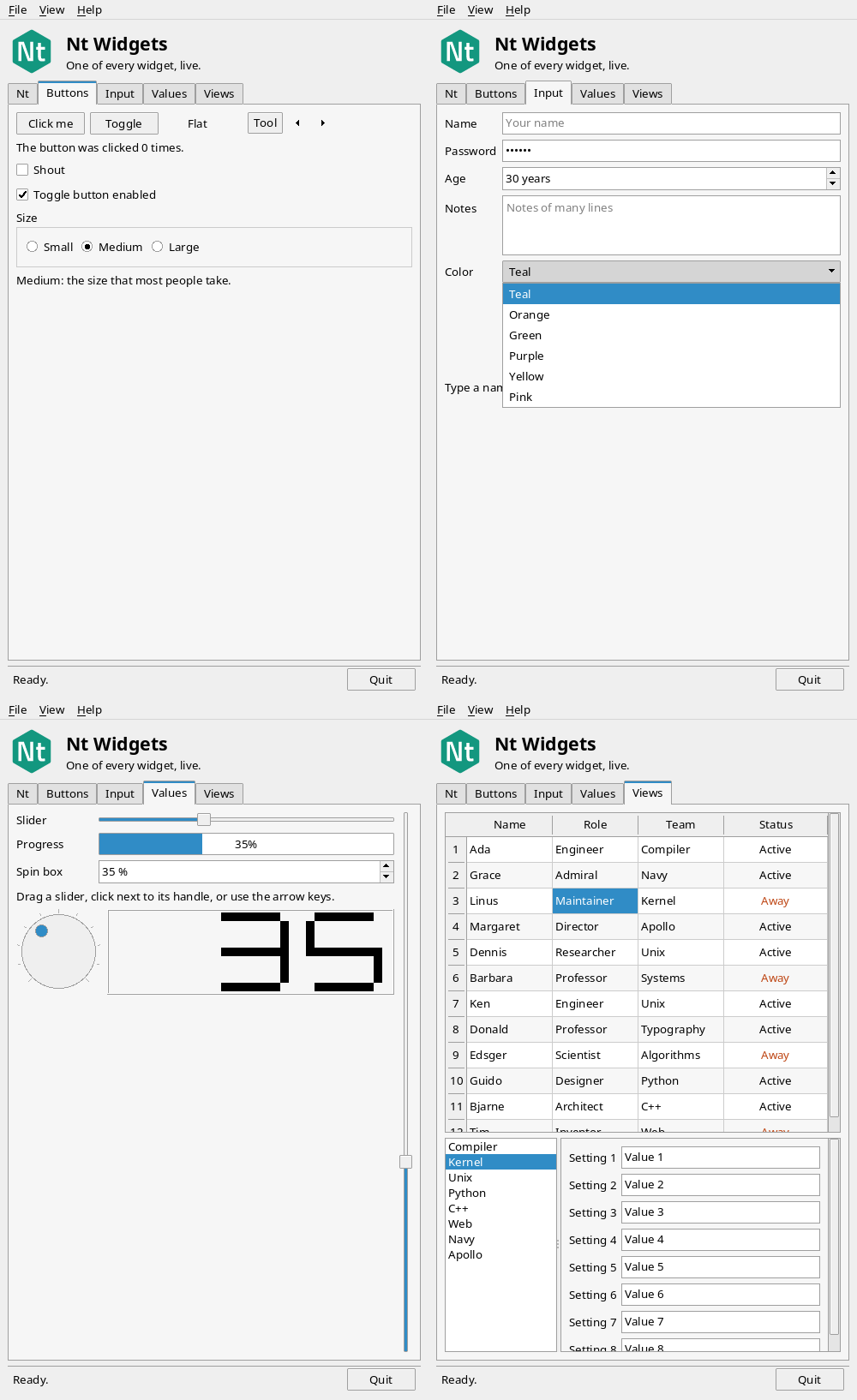
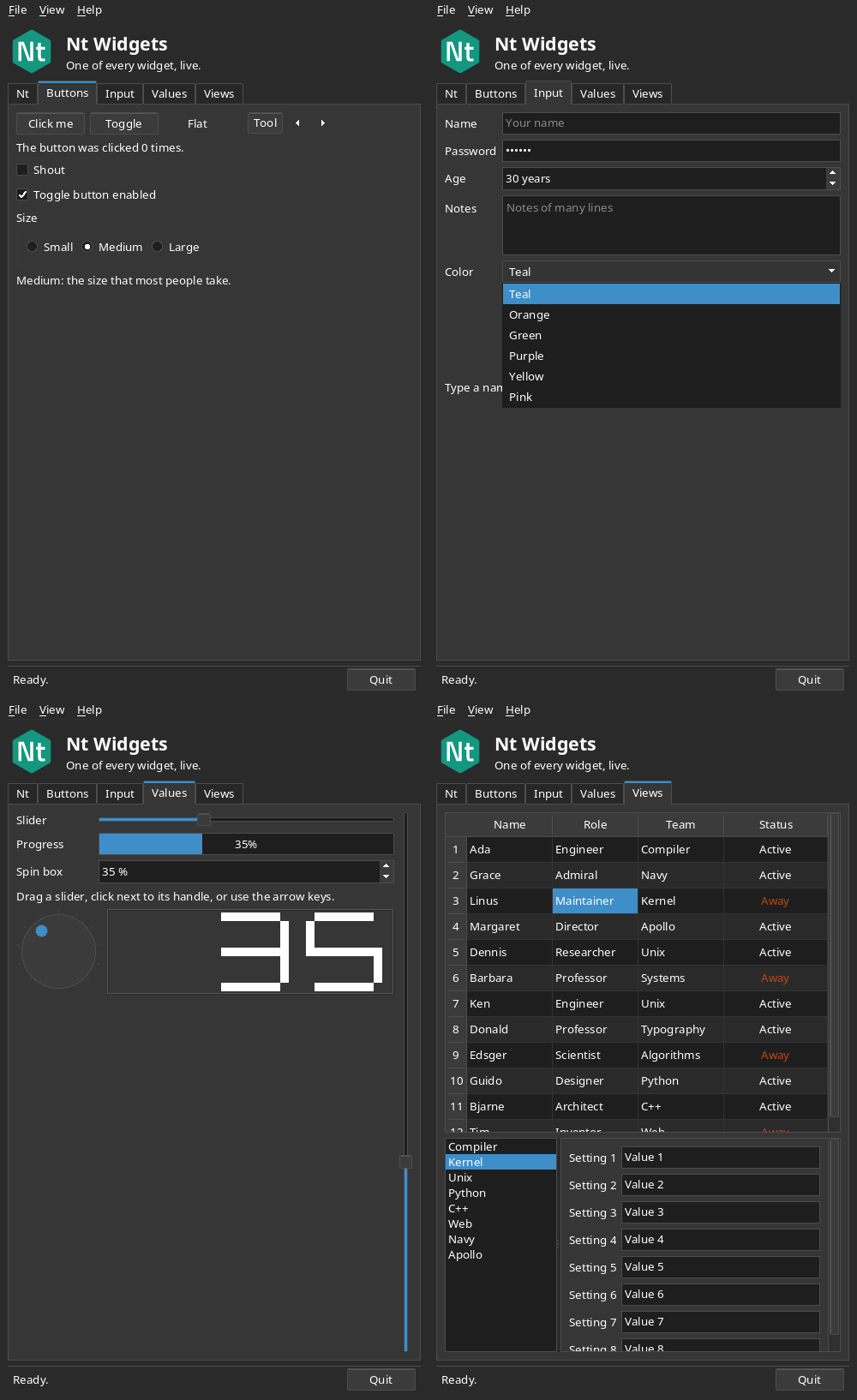
The logo in the header is a picture, not a widget drawn by hand: nt-logo.svg is listed in hello_widgets.qrc, which compiles it into the program as the resource :/nt-logo.svg, and a QSvgWidget from Nt SVG shows it at the size it is given. See The Nt Resource System and Using Nt SVG.
Link it with Nt::SvgWidgets, which brings Nt::Widgets with it, and add the resource file:
find_package(Nt6 REQUIRED)
qt_add_resources(resources hello_widgets.qrc)
add_executable(hello_widgets hello_widgets.cpp ${resources})
target_link_libraries(hello_widgets PRIVATE Nt::SvgWidgets)
An application without pictures needs only Nt::Widgets.
examples/widgets/CMakeLists.txt builds the three widget examples on their own against an installed Nt, such as the snap (6.0.0-rc3 or later, which has Nt SVG):
sudo snap install open-nt6
sudo apt install cmake g++ libssl-dev libfreetype-dev libfontconfig-dev libxcb1-dev
cmake -S examples/widgets -B build-widgets -DCMAKE_PREFIX_PATH=/snap/open-nt6/current/usr
cmake --build build-widgets
build-widgets/hello_widgets
Without a display, add -platform offscreen.
The Gallery
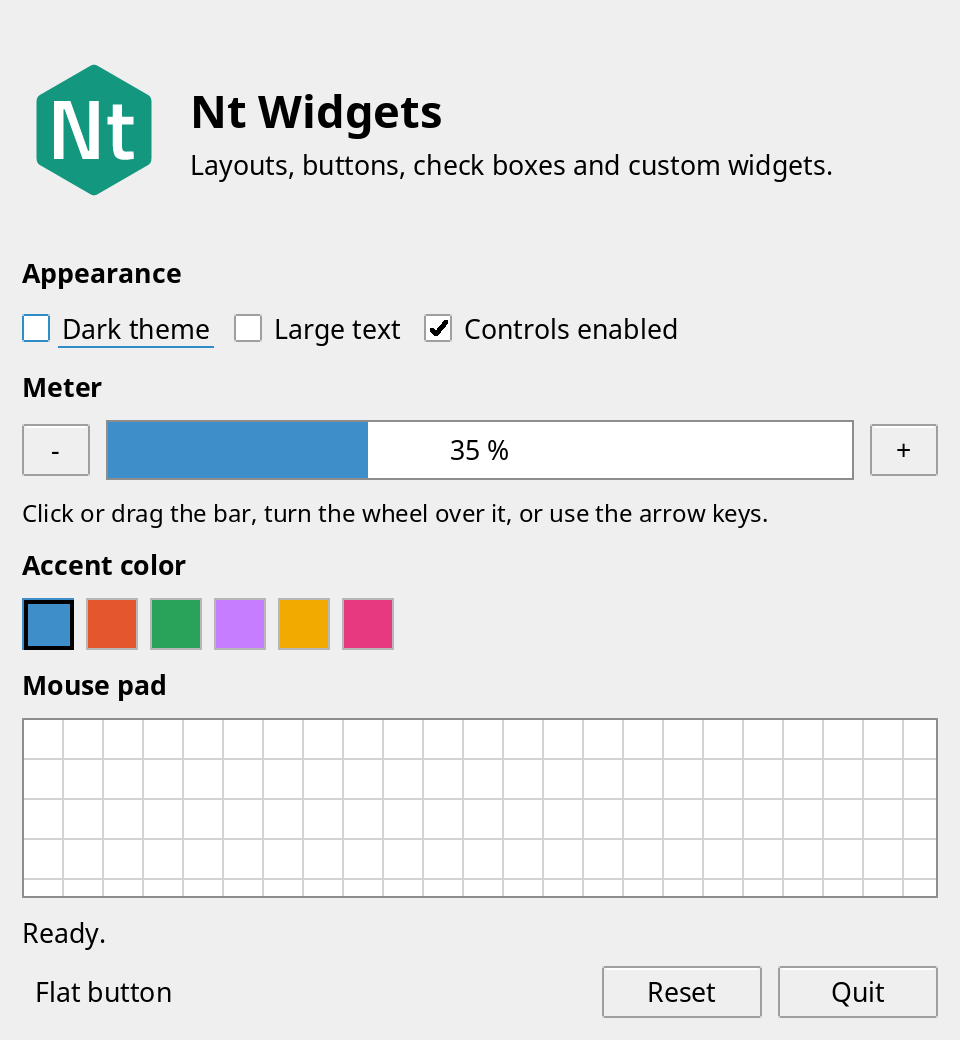
The gallery example shows what the widgets can do: layouts, check boxes and buttons, and custom widgets (a meter, color swatches and a mouse pad) that draw with the palette and handle the mouse, wheel and keys. It follows the color scheme of the desktop, and its Dark theme check box overrides it with QStyleHints::setColorScheme(). Its logo is the same SVG resource in a QSvgWidget, which draws it at the device resolution, so that it stays sharp on a high-resolution screen.
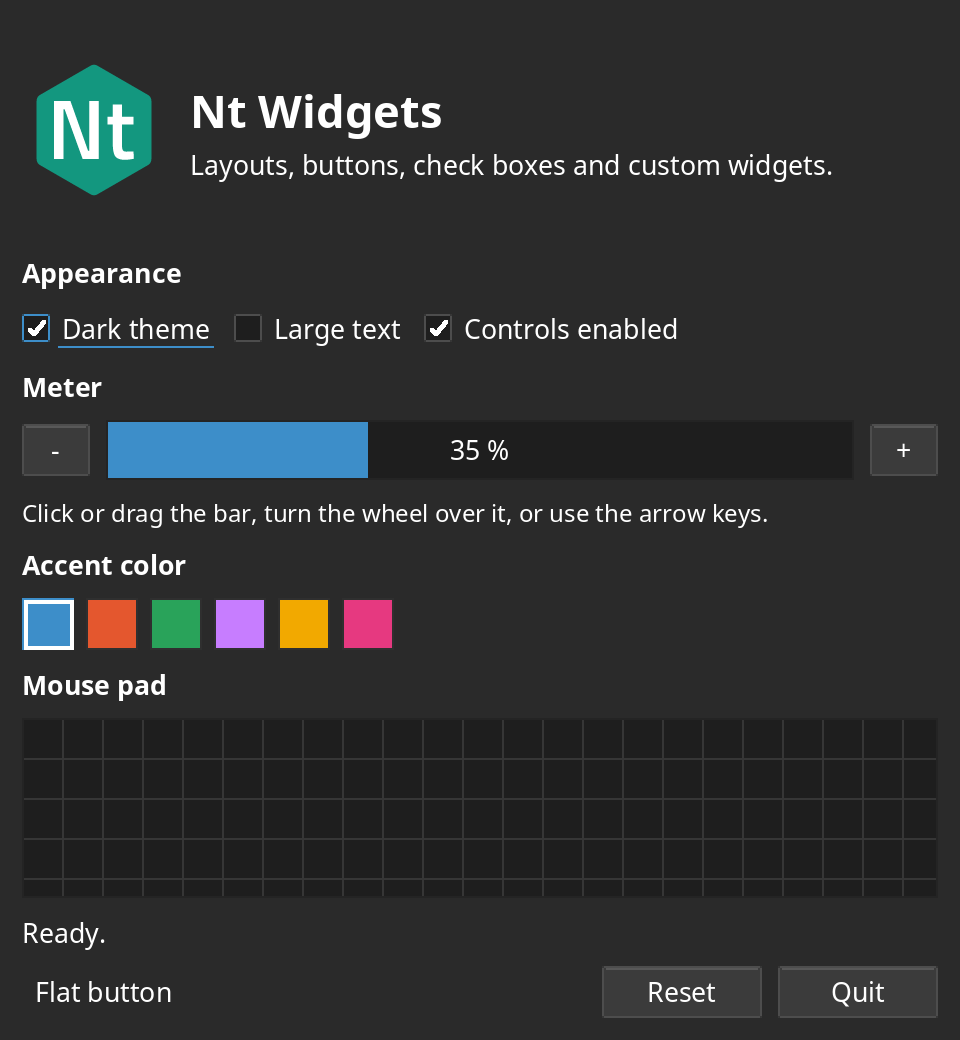
High-Resolution Screens and Dark Mode
The widgets are measured in window coordinates, and the screen decides how many pixels each one covers: QScreen::devicePixelRatio() is 2 on a screen that asks for twice the usual density, and everything a QPainter draws is scaled by it. On the xcb platform the ratio comes from the Xft.dpi resource, or from the QT_SCALE_FACTOR environment variable. The default style follows the desktop's color scheme, which is read from the desktop portal; set your own palette with QApplication::setPalette(), or the scheme with QStyleHints::setColorScheme().
Comparing with Qt
The widget examples use only the API that Nt shares with Qt, so the same sources build against Qt 6. Configure Nt with -DNT_EXAMPLES_QT=ON and the qt_examples target builds them against Qt as hello_widgets_qt and gallery_qt in the qt-examples directory of the build tree, or build examples/qt as a project of its own. Run both with the same font and the Fusion style (QT_STYLE_OVERRIDE=Fusion) to compare. Nt follows the layout of Qt's Fusion style: the sizes of buttons and check boxes, the margins and spacing, and how a layout shares out space, so the widgets of the two sit at the same coordinates. What remains different is small: Qt snaps text to whole pixel sizes, which makes it a little narrower (about 2 percent), the buttons are shaded differently and the check box does not have the same check mark, and Nt draws a focus indicator on a check box that has the focus without the keyboard.
Layouts
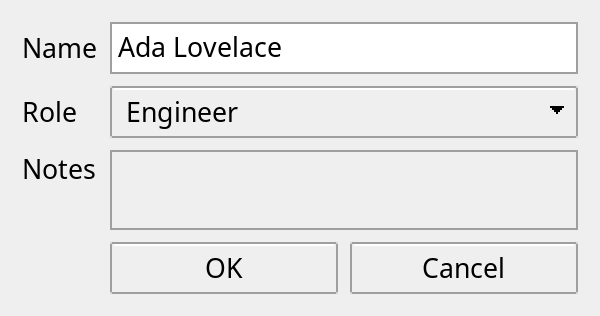
A QGridLayout puts widgets in the cells of a grid; a widget can span several rows and columns, and rows and columns can have a stretch factor:
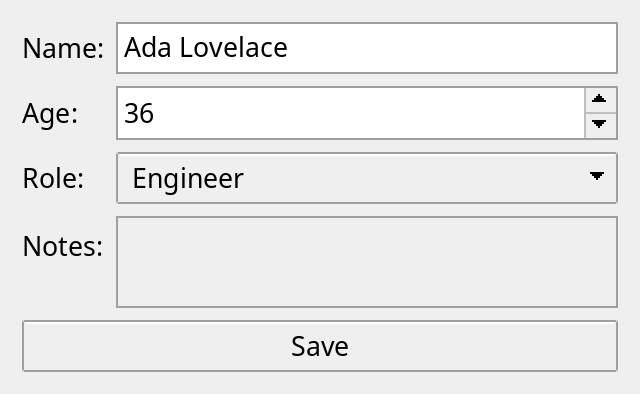
A QFormLayout is made for forms: it puts the labels in one column and the fields in another, so that they line up, and takes care of the sizes the labels and fields should have. A row of one widget goes across the form:
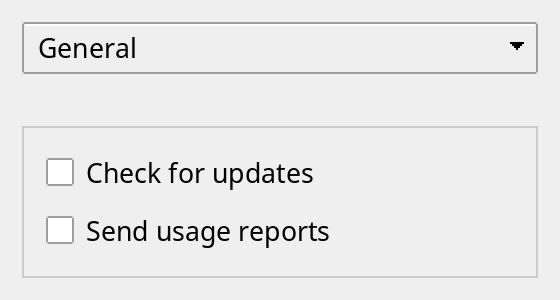
A QStackedLayout shows one of its widgets at a time at the size of the layout, which is how pages are made; QStackedWidget is a widget with one:
A QVBoxLayout stacks widgets from top to bottom, and a QHBoxLayout lines them up from left to right. Layouts can be put in other layouts with addLayout(). A layout asks every widget for its QWidget::sizeHint() and QWidget::sizePolicy(), and shares out the space as Qt does: widgets that want to expand (policy Expanding) or have a stretch factor get what is left over, and widgets with a Fixed policy keep their hint, centered across the layout if it is wider than they are. Call QWidget::updateGeometry() when the size hint of your own widget changes, and the layout is done again from the event loop.
Your Own Widgets
Subclass QWidget, reimplement sizeHint() so that layouts know how large it wants to be, and paintEvent() to draw it. Draw with the colors of QWidget::palette() and the QStyle of the widget, so that the widget follows the look of the application:
class Meter : public QWidget {
public:
    QSize sizeHint() const override { return QSize(120, 16); }

protected:
    void paintEvent(QPaintEvent *) override
    {
        QPainter painter(this);
        painter.fillRect(rect(), palette().base());
        painter.fillRect(0, 0, width() * m_value / 100, height(), palette().highlight());
    }

private:
    int m_value = 40;
};
Mouse events go to the deepest widget under the mouse, and to the widget that was pressed until the button is released. A widget that does not use an event ignores it, and its parent gets it. Key events go to the widget that has the keyboard focus; set a focusPolicy so that it can get it, by tabbing or by clicking.
The Widgets
Widget | What it is for |
|---|---|
A text, with alignment and word wrap; plain, or rich text with links to click. | |
A button to click, an option to switch, and one choice of a group. Radio buttons with the same parent are exclusive. | |
One line of text to type, with selection, a placeholder and a password mode. | |
Items in rows to select, with the mouse or the keys; one, several or none at a time. | |
A tree with columns and a header: QTreeView shows any model of Nt Core, and QTreeWidget keeps its own items. Items are sorted by a click on the header and edited in place through a QStyledItemDelegate. | |
Text of many lines to type and select, with wrapping and undo; QTextCursor moves in it and changes it. QTextEdit also shows rich text, from HTML, and QTextBrowser follows its links. | |
A small button with a text or an arrow, that can be checked or flat. | |
A value to turn on a dial, and one to show with seven-segment digits. | |
Widgets side by side or one above the other, with handles to share the room between them. | |
A strip at the bottom of a window for a message and small widgets. | |
The titles at the top of a window, and the lists of actions that they open; QMenu pops up anywhere, too. | |
A whole number to type or step. | |
One item to choose from a list that drops down. | |
A value to drag, and one to show. | |
A frame with a title around other widgets, which can have a check box to switch them all. | |
Pages with a row of tabs to choose the page. | |
Pages of which one is shown; connect it to what chooses the page. | |
A box, a panel or a line around or between other widgets; the base of the scroll areas. | |
A bar to scroll with, and a view of a larger widget with scroll bars. | |
Rows and columns of items with row and column headers, which scrolls. Items have text, colors, an alignment and a tool tip. | |
A text that explains a widget, shown when the mouse rests on it: set it with QWidget::setToolTip(). |
Tables and Scroll Areas
A QTableWidget has an item for each cell that is not empty. You can reach the headers to size or label them, and the table tells you which cell the user clicked. Rest the mouse over a cell for the tool tip of its item:
QTableWidget *table = new QTableWidget(3, 2, window);
table->setHorizontalHeaderLabels({"Name", "Role"});
table->horizontalHeader()->setStretchLastSection(true);
QTableWidgetItem *ada = new QTableWidgetItem("Ada");
ada->setToolTip("The first programmer");
table->setItem(0, 0, ada);
connect(table, &QTableWidget::cellClicked, [](int row, int column) { qDebug() << row << column; });
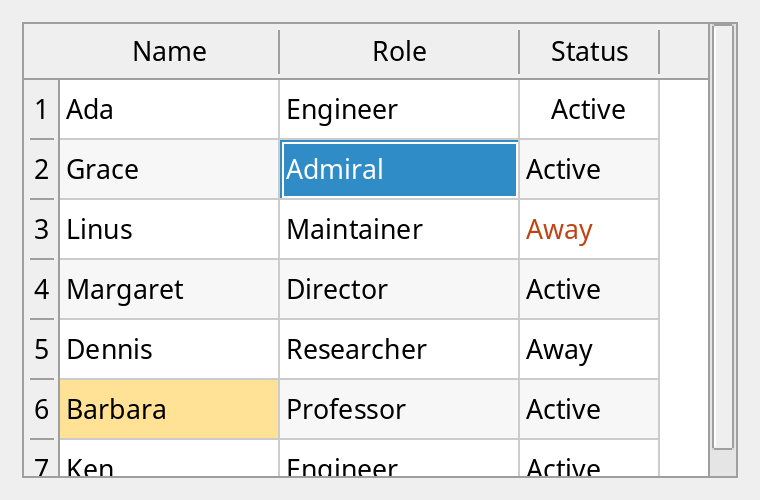
A QScrollArea shows a part of one widget and has the scroll bars to move it. To make your own widget scroll, derive from QAbstractScrollArea, paint on its viewport(), and set the range of the scroll bars when the viewport or your contents change.
The page of each widget class shows how the widget is drawn: normal, with the keyboard focus, pressed, checked, read-only and disabled where that applies, in the light color scheme. The pictures are made by the render_widgets program, which calls QWidget::render() to paint the widgets on an image.
Actions and Menus
A QAction is something the user can do, with a text, a shortcut and a state of being enabled or checked in one place. Add it to a QMenu and to any widget, and it is the same action in both. QMenu and QMenuBar show actions; a shortcut such as QKeySequence::Save works wherever the action has been added in the window that has the focus.
QMenuBar *bar = new QMenuBar(window);
QMenu *file = bar->addMenu("&File");
QAction *save = file->addAction("&Save");
save->setShortcut(QKeySequence::Save);
connect(save, &QAction::triggered, window, &Editor::save);
file->addSeparator();
file->addAction("&Quit", [] { QApplication::quit(); });
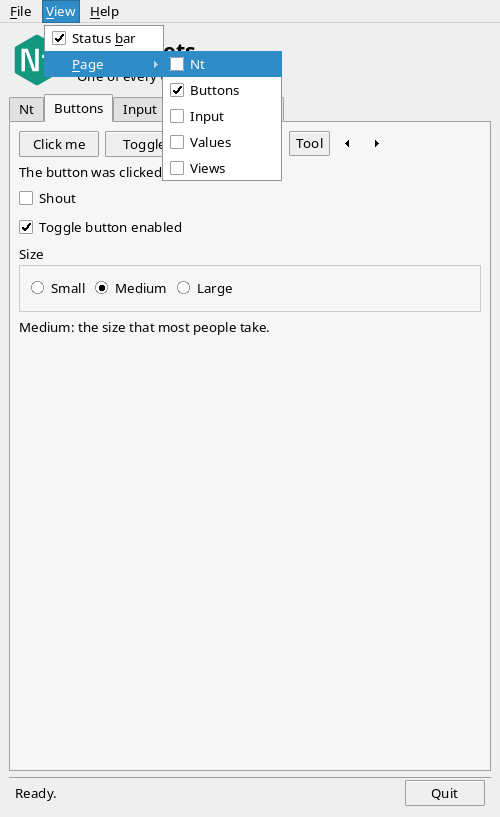
A menu pops up in the window of its parent: it is a child widget, above the others, and not a window of its own, so it cannot reach outside the window (it moves to stay inside). The QMenu::exec() function opens a menu where you say and waits for the user to choose.
What Is Not There Yet
There are no trees, no model and view classes (a table and a list keep their items themselves, and cannot be edited or sorted by the user), no native dialogs, and tool bars and dock widgets cannot be dragged. The native window of a window, top-level or with a parent such as a dialog, is a QWindow; child widgets are painted into the backing store of that window and are not native windows themselves. Each class lists what differs from Qt in its Differences from Qt section.
See also QApplication, QWidget, QLayout and QStyle.