
QLCDNumber Class
The QLCDNumber class shows a number with digits that look like those of a calculator. More…
| Header | #include <QLCDNumber> |
|---|---|
| CMake | target_link_libraries(app PRIVATE Nt::Widgets) |
| Module | Nt Widgets C++ Classes |
| Inherits | QFrame |
List of all members, including inherited members
Public Types
| enum | Mode |
| enum | SegmentStyle |
Public Functions
| QLCDNumber(QWidget *parent = nullptr) | |
| QLCDNumber(uint numDigits, QWidget *parent = nullptr) | |
| ~QLCDNumber() | |
| bool | smallDecimalPoint() const |
| void | setSmallDecimalPoint(bool on) |
| int | digitCount() const |
| void | setDigitCount(int numDigits) |
| Mode | mode() const |
| void | setMode(Mode mode) |
| SegmentStyle | segmentStyle() const |
| void | setSegmentStyle(SegmentStyle style) |
| double | value() const |
| int | intValue() const |
| bool | checkOverflow(double num) const |
| bool | checkOverflow(int num) const |
Reimplemented Public Functions
Public Slots
| void | display(const QString &str) |
| void | display(int num) |
| void | display(double num) |
| void | setHexMode() |
| void | setDecMode() |
| void | setOctMode() |
| void | setBinMode() |
Signals
| void | overflow() |
Reimplemented Protected Functions
| void | paintEvent(QPaintEvent *event) |
Detailed Description
The number is set with display(), and shown in decimal, hexadecimal, octal or binary. The digits are made of seven segments, and a display has as many digits as digitCount() says; a number that needs more is an overflow:
QLCDNumber *clock = new QLCDNumber(8, window);
clock->display("12:30");
QLCDNumber *count = new QLCDNumber(window);
count->display(42);
Displays with a number, a hexadecimal number, a number with a decimal point, a minus sign, and the outline style.
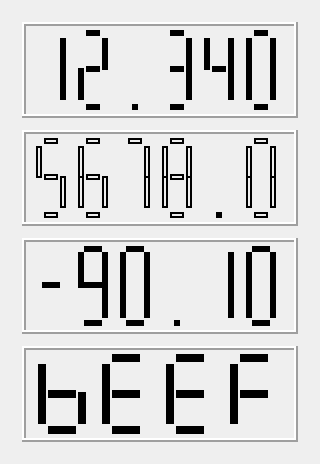
See also QProgressBar and QSpinBox.
Differences from Qt
The segments are rectangles, without the slanted ends of Qt's, and Flat is the same as Filled but without the space between the segments. The characters that can be shown are the digits, A to F, the minus sign, a space, and a few letters; the colon of a clock and the quotation mark are drawn as spaces. A number is formatted to fit with fewer digits than Qt does for numbers that are not whole.
Member Type Documentation
enum QLCDNumber::Mode
This enum says how a number is written.
| Constant | Description |
|---|---|
QLCDNumber::Hex | Hexadecimal, with the digits 0 to F. |
QLCDNumber::Dec | Decimal. |
QLCDNumber::Oct | Octal. |
QLCDNumber::Bin | Binary. |
enum QLCDNumber::SegmentStyle
This enum says how the segments of a digit are drawn.
| Constant | Description |
|---|---|
QLCDNumber::Outline | Only the outline of the segments, in the text color. |
QLCDNumber::Filled | The segments are filled, with a small space between them. |
QLCDNumber::Flat | The segments are filled and touch each other. |
Member Function Documentation
QLCDNumber::QLCDNumber(QWidget *parent = nullptr)
Constructs a display with five digits and the given parent.
QLCDNumber::QLCDNumber(uint numDigits, QWidget *parent = nullptr)
Constructs a display with numDigits digits and the given parent.
QLCDNumber::~QLCDNumber()
Destroys the display.
bool QLCDNumber::checkOverflow(double num) const
Returns true if num needs more digits than the display has.
See also display().
bool QLCDNumber::checkOverflow(int num) const
This is an overloaded function.
Returns true if the whole number num needs more digits than the display has.
int QLCDNumber::digitCount() const
Returns the number of digits, 5 by default.
See also setDigitCount().
void QLCDNumber::display(const QString &str)
Shows the text str: digits, A to F, minus signs, spaces and a few letters. The value() becomes the number that the text makes, or 0.
See also value().
void QLCDNumber::display(int num)
This is an overloaded function.
Shows the whole number num in the base of the display.
void QLCDNumber::display(double num)
This is an overloaded function.
Shows the number num, with as many digits as there is room for. In the hexadecimal, octal and binary modes, it is shown as a whole number.
int QLCDNumber::intValue() const
Returns the number that is shown, rounded to a whole number.
See also value().
Mode QLCDNumber::mode() const
Returns the base of the numbers that are shown, Dec by default.
See also setMode().
void QLCDNumber::overflow()
This signal is emitted when what is displayed has more digits than the display has.
void QLCDNumber::paintEvent(QPaintEvent *event)
Reimplements QFrame::paintEvent().
SegmentStyle QLCDNumber::segmentStyle() const
Returns how the segments are drawn, Filled by default.
See also setSegmentStyle().
void QLCDNumber::setBinMode()
Sets the base of the numbers that are shown to binary; the same as setMode(Bin).
See also setMode().
void QLCDNumber::setDecMode()
Sets the base of the numbers that are shown to decimal; the same as setMode(Dec).
See also setMode().
void QLCDNumber::setDigitCount(int numDigits)
Sets the number of digits to numDigits, from 0 to 99. What is shown is formatted again.
See also digitCount().
void QLCDNumber::setHexMode()
Sets the base of the numbers that are shown to hexadecimal; the same as setMode(Hex).
See also setMode().
void QLCDNumber::setMode(Mode mode)
Sets the base of the numbers that are shown to mode, and shows the number again.
See also mode().
void QLCDNumber::setOctMode()
Sets the base of the numbers that are shown to octal; the same as setMode(Oct).
See also setMode().
void QLCDNumber::setSegmentStyle(SegmentStyle style)
Sets how the segments are drawn to style.
See also segmentStyle().
void QLCDNumber::setSmallDecimalPoint(bool on)
Sets whether the decimal point is drawn small, and does not use a digit, to on.
See also smallDecimalPoint().
QSize QLCDNumber::sizeHint() const
Reimplements QFrame::sizeHint().
bool QLCDNumber::smallDecimalPoint() const
Returns whether the decimal point is drawn small, between the digits, so that it does not use a digit. The default is false.
See also setSmallDecimalPoint().
double QLCDNumber::value() const
Returns the number that is shown.
See also display() and intValue().