
QSpinBox Class
The QSpinBox class lets the user pick an integer by typing it or stepping with two buttons. More…
| Header | #include <QSpinBox> |
|---|---|
| CMake | target_link_libraries(app PRIVATE Nt::Widgets) |
| Module | Nt Widgets C++ Classes |
| Inherits | QAbstractSpinBox |
List of all members, including inherited members
Public Functions
| QSpinBox(QWidget *parent = nullptr) | |
| ~QSpinBox() | |
| int | minimum() const |
| void | setMinimum(int minimum) |
| int | maximum() const |
| void | setMaximum(int maximum) |
| void | setRange(int minimum, int maximum) |
| int | value() const |
| int | singleStep() const |
| void | setSingleStep(int step) |
| QString | prefix() const |
| void | setPrefix(const QString &prefix) |
| QString | suffix() const |
| void | setSuffix(const QString &suffix) |
| QString | cleanText() const |
Reimplemented Public Functions
| void | stepBy(int steps) |
Public Slots
| void | setValue(int value) |
Signals
| void | valueChanged(int value) |
| void | textChanged(const QString &text) |
Protected Functions
| virtual QString | textFromValue(int value) const |
| virtual int | valueFromText(const QString &text) const |
Reimplemented Protected Functions
| StepEnabled | stepEnabled() const |
Detailed Description
A spin box shows a number in a text that the user can edit, with a button to step up and one to step down. The arrow keys, Page Up and Page Down, and the mouse wheel step too. A prefix and a suffix, such as a unit, are shown around the number:
QSpinBox *size = new QSpinBox(window);
size->setRange(8, 72);
size->setSuffix(" pt");
connect(size, &QSpinBox::valueChanged, [](int value) { qDebug() << value; });
Spin boxes: plain, with a suffix and the keyboard focus, with a prefix, at the largest value, and disabled.
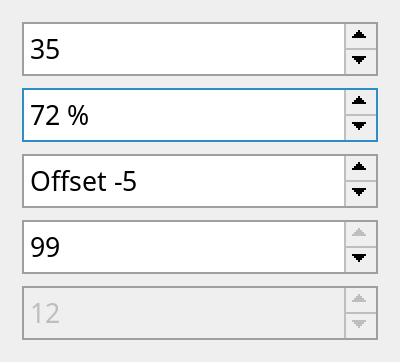
See also QDoubleSpinBox, QSlider and QLineEdit.
Differences from Qt
There is no displayIntegerBase() or stepType(). textFromValue() and valueFromText() see the number without the prefix and the suffix, and what the user types is checked by turning it into a value and back.
Member Function Documentation
QSpinBox::QSpinBox(QWidget *parent = nullptr)
Constructs a spin box with the given parent. The range is 0 to 99 and the value 0.
QSpinBox::~QSpinBox()
Destroys the spin box.
QString QSpinBox::cleanText() const
Returns the number as text, without the prefix and the suffix.
See also text().
int QSpinBox::maximum() const
Returns the largest value, 99 by default.
See also setMaximum() and setRange().
int QSpinBox::minimum() const
Returns the smallest value, 0 by default.
See also setMinimum() and setRange().
QString QSpinBox::prefix() const
Returns the text shown before the number.
See also setPrefix() and suffix().
void QSpinBox::setMaximum(int maximum)
Sets the largest value to maximum. The smallest value falls to the same if it was larger.
See also maximum().
void QSpinBox::setMinimum(int minimum)
Sets the smallest value to minimum. The largest value grows to the same if it was smaller.
See also minimum().
void QSpinBox::setPrefix(const QString &prefix)
Sets the text shown before the number to prefix.
See also prefix().
void QSpinBox::setRange(int minimum, int maximum)
Sets the range of the spin box to minimum to maximum. If maximum is less than minimum, it is made equal. The value is brought into the range.
See also minimum() and maximum().
void QSpinBox::setSingleStep(int step)
Sets the step to step, at least 1.
See also singleStep().
void QSpinBox::setSuffix(const QString &suffix)
Sets the text shown after the number to suffix.
See also suffix().
void QSpinBox::setValue(int value)
Sets the value to value, brought into the range. Emits valueChanged() if the value changes.
See also value().
int QSpinBox::singleStep() const
Returns how much a step changes the value by, 1 by default.
See also setSingleStep().
void QSpinBox::stepBy(int steps)
Reimplements QAbstractSpinBox::stepBy().
The value moves by steps times singleStep(). Past an end it stops there, or goes round to the other end if the spin box wraps.
StepEnabled QSpinBox::stepEnabled() const
Reimplements QAbstractSpinBox::stepEnabled().
QString QSpinBox::suffix() const
Returns the text shown after the number, such as a unit.
See also setSuffix() and prefix().
void QSpinBox::textChanged(const QString &text)
This signal is emitted when the value changes, with the text that shows it, prefix and suffix included.
QString QSpinBox::textFromValue(int value) const
Returns the text for value, without the prefix and the suffix. The default implementation writes the number in decimal; reimplement it to show the value in another way, together with valueFromText().
See also valueFromText().
int QSpinBox::value() const
Returns the value.
See also setValue().
void QSpinBox::valueChanged(int value)
This signal is emitted when the value changes to value, whether the user changed it by typing or with the buttons, or setValue() did.
int QSpinBox::valueFromText(const QString &text) const
Returns the value for text, which is the text between the prefix and the suffix. The default implementation reads a decimal number.
See also textFromValue().