
QCheckBox Class
The QCheckBox class provides a checkbox with a text label. More…
| Header | #include <QCheckBox> |
|---|---|
| CMake | target_link_libraries(app PRIVATE Nt::Widgets) |
| Module | Nt Widgets C++ Classes |
| Inherits | QAbstractButton |
List of all members, including inherited members
Public Functions
| QCheckBox(QWidget *parent = nullptr) | |
| QCheckBox(const QString &text, QWidget *parent = nullptr) | |
| ~QCheckBox() |
Reimplemented Public Functions
Reimplemented Protected Functions
| void | paintEvent(QPaintEvent *event) |
| bool | hitButton(const QPoint &pos) const |
Detailed Description
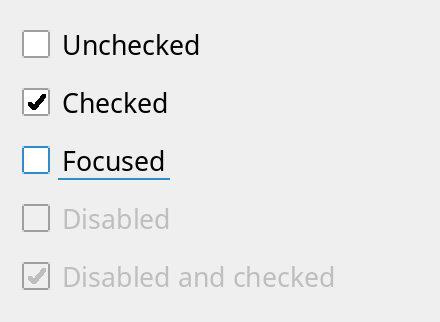
A check box is a checkable button that shows its state in an indicator next to the text. Connect to toggled():
QCheckBox *box = new QCheckBox("Remember me", window);
box->setChecked(true);
Check boxes: unchecked, checked, with the keyboard focus, and disabled.
See also QAbstractButton and QPushButton.
Differences from Qt
There are no tristate check boxes and no stateChanged() signal or checkState(); use toggled() and isChecked().
Member Function Documentation
QCheckBox::QCheckBox(QWidget *parent = nullptr)
Constructs a check box with no text and the given parent.
QCheckBox::QCheckBox(const QString &text, QWidget *parent = nullptr)
Constructs a check box that shows text, with the given parent.
QCheckBox::~QCheckBox()
Destroys the check box.
bool QCheckBox::hitButton(const QPoint &pos) const
Reimplements QAbstractButton::hitButton().
void QCheckBox::paintEvent(QPaintEvent *event)
Reimplements QAbstractButton::paintEvent().
QSize QCheckBox::sizeHint() const
Reimplements QAbstractButton::sizeHint().