
QPushButton Class
The QPushButton class provides a command button. More…
| Header | #include <QPushButton> |
|---|---|
| CMake | target_link_libraries(app PRIVATE Nt::Widgets) |
| Module | Nt Widgets C++ Classes |
| Inherits | QAbstractButton |
| Inherited by | QCommandLinkButton |
List of all members, including inherited members
Public Functions
| QPushButton(QWidget *parent = nullptr) | |
| QPushButton(const QString &text, QWidget *parent = nullptr) | |
| ~QPushButton() | |
| bool | isFlat() const |
| void | setFlat(bool flat) |
| bool | autoDefault() const |
| void | setAutoDefault(bool enable) |
| bool | isDefault() const |
| void | setDefault(bool enable) |
Reimplemented Public Functions
Reimplemented Protected Functions
| void | paintEvent(QPaintEvent *event) |
| void | keyPressEvent(QKeyEvent *event) |
| void | focusInEvent(QFocusEvent *event) |
| void | focusOutEvent(QFocusEvent *event) |
Detailed Description
A push button is clicked to run a command. Connect to clicked():
QPushButton *quit = new QPushButton("Quit", window);
QObject::connect(quit, &QPushButton::clicked, &app, &QApplication::quit);
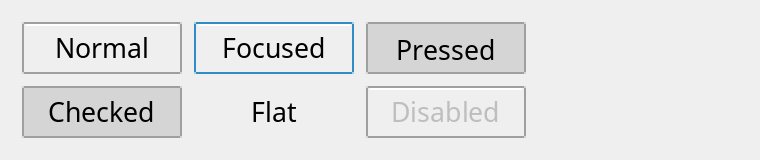
The button is drawn by the style: it looks pressed while it is down, and shows the keyboard focus. Space clicks the button while it has the focus.
In a QDialog, Return and Enter click the default button: the button that has the focus if it is an auto-default button, which the buttons of a dialog are, and otherwise the one set with setDefault():
QPushButton *ok = new QPushButton("OK", dialog);
ok->setDefault(true);
connect(ok, &QPushButton::clicked, dialog, &QDialog::accept);
Push buttons: normal, with the keyboard focus, pressed, checked, flat, and disabled.
See also QAbstractButton and QCheckBox.
Differences from Qt
There are no icons and no menus (setMenu()).
Member Function Documentation
QPushButton::QPushButton(QWidget *parent = nullptr)
Constructs a button with no text and the given parent.
QPushButton::QPushButton(const QString &text, QWidget *parent = nullptr)
Constructs a button that shows text, with the given parent.
QPushButton::~QPushButton()
Destroys the button.
bool QPushButton::autoDefault() const
Returns whether the button becomes the default button of its dialog while it has the focus. Unless it was set, it is true for a button in a QDialog and false otherwise.
See also setAutoDefault() and isDefault().
void QPushButton::focusInEvent(QFocusEvent *event)
Reimplements QAbstractButton::focusInEvent().
void QPushButton::focusOutEvent(QFocusEvent *event)
Reimplements QAbstractButton::focusOutEvent().
bool QPushButton::isDefault() const
Returns whether the button is the default button of its dialog: the one that Return clicks when no auto-default button has the focus. The default is false.
See also setDefault().
bool QPushButton::isFlat() const
Returns whether the button is flat: it has no bevel until the mouse is over it or it is pressed. The default is false.
See also setFlat().
void QPushButton::keyPressEvent(QKeyEvent *event)
Reimplements QAbstractButton::keyPressEvent().
void QPushButton::paintEvent(QPaintEvent *event)
Reimplements QAbstractButton::paintEvent().
void QPushButton::setAutoDefault(bool enable)
Sets whether the button becomes the default button of its dialog while it has the focus to enable.
See also autoDefault().
void QPushButton::setDefault(bool enable)
Makes the button the default button of its dialog if enable is true. The other push buttons of the dialog stop being the default. The default button is drawn with a stronger border.
See also isDefault() and autoDefault().
void QPushButton::setFlat(bool flat)
Sets whether the button is flat to flat.
See also isFlat().
QSize QPushButton::sizeHint() const
Reimplements QAbstractButton::sizeHint().