
QGroupBox Class
The QGroupBox class is a frame with a title that groups other widgets. More…
| Header | #include <QGroupBox> |
|---|---|
| CMake | target_link_libraries(app PRIVATE Nt::Widgets) |
| Module | Nt Widgets C++ Classes |
| Inherits | QWidget |
List of all members, including inherited members
Public Functions
| QGroupBox(QWidget *parent = nullptr) | |
| QGroupBox(const QString &title, QWidget *parent = nullptr) | |
| ~QGroupBox() | |
| QString | title() const |
| void | setTitle(const QString &title) |
| bool | isCheckable() const |
| void | setCheckable(bool checkable) |
| bool | isChecked() const |
Reimplemented Public Functions
| QSize | sizeHint() const |
| QSize | minimumSizeHint() const |
Public Slots
| void | setChecked(bool checked) |
Signals
Reimplemented Protected Functions
| void | paintEvent(QPaintEvent *event) |
| void | mousePressEvent(QMouseEvent *event) |
| void | mouseReleaseEvent(QMouseEvent *event) |
| void | keyPressEvent(QKeyEvent *event) |
| void | changeEvent(QEvent *event) |
Detailed Description
A group box draws a frame around its children, with a title on its top edge. Put a layout on it for the children, as for any widget. The radio buttons that are children of a group box are exclusive to each other, which is the way to have several groups of them in a window:
QGroupBox *box = new QGroupBox("Size", window);
QVBoxLayout *layout = new QVBoxLayout(box);
layout->addWidget(new QRadioButton("Small", box));
layout->addWidget(new QRadioButton("Large", box));
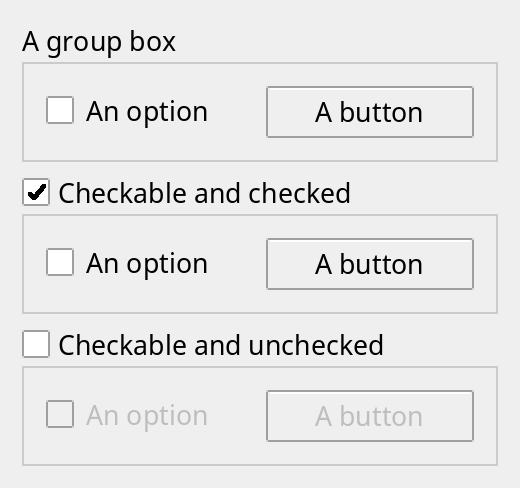
A checkable group box has a check box in its title, and its children are disabled while it is unchecked.
Group boxes: plain, checkable and checked, and checkable and unchecked, which disables what is inside.
See also QRadioButton and QCheckBox.
Differences from Qt
The title is always at the top left: there is no setAlignment(), and no setFlat(). The children are enabled and disabled when the group box is checked and unchecked, but not when they are added later.
Member Function Documentation
QGroupBox::QGroupBox(QWidget *parent = nullptr)
Constructs a group box with no title and the given parent.
QGroupBox::QGroupBox(const QString &title, QWidget *parent = nullptr)
Constructs a group box with the title title and the given parent.
QGroupBox::~QGroupBox()
Destroys the group box.
void QGroupBox::changeEvent(QEvent *event)
Reimplements QWidget::changeEvent().
void QGroupBox::clicked(bool checked = false)
This signal is emitted when the user clicks the check box in the title of the group box, and checked is its state afterwards.
bool QGroupBox::isCheckable() const
Returns whether the group box has a check box in its title. The default is false.
See also setCheckable() and isChecked().
bool QGroupBox::isChecked() const
Returns whether a checkable group box is checked, which it is at first.
See also setChecked().
void QGroupBox::keyPressEvent(QKeyEvent *event)
Reimplements QWidget::keyPressEvent().
QSize QGroupBox::minimumSizeHint() const
Reimplements QWidget::minimumSizeHint().
void QGroupBox::mousePressEvent(QMouseEvent *event)
Reimplements QWidget::mousePressEvent().
void QGroupBox::mouseReleaseEvent(QMouseEvent *event)
Reimplements QWidget::mouseReleaseEvent().
void QGroupBox::paintEvent(QPaintEvent *event)
Reimplements QWidget::paintEvent().
void QGroupBox::setCheckable(bool checkable)
Sets whether the group box has a check box in its title to checkable. A checkable group box can be given the keyboard focus.
See also isCheckable().
void QGroupBox::setChecked(bool checked)
Checks a checkable group box if checked is true and unchecks it otherwise, which enables or disables its children. Emits toggled() if the state changes.
See also isChecked().
void QGroupBox::setTitle(const QString &title)
Sets the title to title.
See also title().
QSize QGroupBox::sizeHint() const
Reimplements QWidget::sizeHint().
QString QGroupBox::title() const
Returns the title.
See also setTitle().
void QGroupBox::toggled(bool on)
This signal is emitted when the state of a checkable group box changes to on.