
QToolTip Class
The QToolTip class shows a text in a small label next to the mouse. More…
| Header | #include <QToolTip> |
|---|---|
| CMake | target_link_libraries(app PRIVATE Nt::Widgets) |
| Module | Nt Widgets C++ Classes |
List of all members, including inherited members
Static Public Members
| void | showText(const QPoint &pos, const QString &text, QWidget *w = nullptr, const QRect &rect = QRect()) |
| void | hideText() |
| bool | isVisible() |
| QString | text() |
Detailed Description
A tool tip explains a widget. Most of the time QWidget::setToolTip() is all that is needed: the window shows the tool tip of the widget under the mouse when the mouse has rested there for a moment, and takes it away when the mouse moves to another widget, a mouse button or a key is pressed, or the mouse leaves the window.
button->setToolTip("Saves the document");
A tool tip next to its button, below and to the right of the mouse.
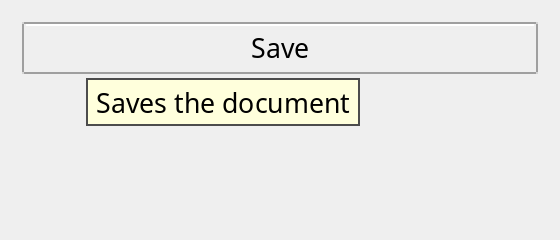
To show a tool tip that depends on where the mouse is, as QTableWidget does for the cells, reimplement QWidget::event() for the QEvent::ToolTip event and call showText() from it. The tool tip is a label inside the window of the widget, not a window of its own, so it never reaches outside the window. It is drawn by the style with the ToolTipBase and ToolTipText colors of the palette.
See also QWidget::toolTip() and QHelpEvent.
Differences from Qt
There are no setPalette(), setFont(), palette(), font() and showText() with a display time, no rich text, and no QToolTip::isVisible() for a tool tip of another window. A tool tip is always inside the window, so one that shows a long text is not wider than the window.
Member Function Documentation
void QToolTip::hideText()
Hides the tool tip, if one is shown.
See also showText().
bool QToolTip::isVisible()
Returns whether a tool tip is shown.
See also text().
void QToolTip::showText(const QPoint &pos, const QString &text, QWidget *w = nullptr, const QRect &rect = QRect())
Shows text in a tool tip, with its top left corner a little below and to the right of pos, which is on the screen. w is the widget that the tool tip is for: its window holds the tool tip. If w is nullptr, the active window does, or else the first window. If rect is not empty, the tool tip goes away when the mouse leaves it; it is in the coordinates of w. An empty text hides the tool tip. A tool tip that is shown replaces the one before.
See also hideText().
QString QToolTip::text()
Returns the text of the tool tip that is shown, or an empty string if there is none.
See also isVisible().