
QListWidget Class
The QListWidget class provides a list of items, one on each row. More…
| Header | #include <QListWidget> |
|---|---|
| CMake | target_link_libraries(app PRIVATE Nt::Widgets) |
| Module | Nt Widgets C++ Classes |
| Inherits | QAbstractItemView |
List of all members, including inherited members
Public Functions
| QListWidget(QWidget *parent = nullptr) | |
| ~QListWidget() | |
| int | count() const |
| QListWidgetItem * | item(int row) const |
| int | row(const QListWidgetItem *item) const |
| void | addItem(QListWidgetItem *item) |
| void | addItem(const QString &text) |
| void | addItems(const QStringList &labels) |
| void | insertItem(int row, QListWidgetItem *item) |
| void | insertItem(int row, const QString &text) |
| void | insertItems(int row, const QStringList &labels) |
| QListWidgetItem * | takeItem(int row) |
| void | sortItems(Qt::SortOrder order = Qt::AscendingOrder) |
| QListWidgetItem * | currentItem() const |
| void | setCurrentItem(QListWidgetItem *item) |
| int | currentRow() const |
| QList<QListWidgetItem *> | selectedItems() const |
| QListWidgetItem * | itemAt(const QPoint &pos) const |
| QListWidgetItem * | itemAt(int x, int y) const |
| QRect | visualItemRect(const QListWidgetItem *item) const |
| void | scrollToItem(const QListWidgetItem *item) |
| int | rowHeight() const |
Public Slots
| void | setCurrentRow(int row) |
| void | clear() |
| void | selectAll() |
Signals
| void | currentItemChanged(QListWidgetItem *current, QListWidgetItem *previous) |
| void | currentRowChanged(int currentRow) |
| void | currentTextChanged(const QString ¤tText) |
| void | itemClicked(QListWidgetItem *item) |
| void | itemDoubleClicked(QListWidgetItem *item) |
| void | itemActivated(QListWidgetItem *item) |
| void | itemSelectionChanged() |
Reimplemented Protected Functions
| bool | viewportEvent(QEvent *event) |
| void | paintEvent(QPaintEvent *event) |
| void | resizeEvent(QResizeEvent *event) |
| void | showEvent(QShowEvent *event) |
| void | scrollContentsBy(int dx, int dy) |
| void | mousePressEvent(QMouseEvent *event) |
| void | mouseReleaseEvent(QMouseEvent *event) |
| void | mouseDoubleClickEvent(QMouseEvent *event) |
| void | keyPressEvent(QKeyEvent *event) |
| void | focusInEvent(QFocusEvent *event) |
| void | focusOutEvent(QFocusEvent *event) |
| void | changeEvent(QEvent *event) |
Detailed Description
A list shows its items as rows of text, and the user selects with the mouse or the keys. It scrolls when there are more rows than fit. Add items with addItem() and read the choice from currentItem(), or connect to the signals:
QListWidget *list = new QListWidget(window);
list->addItems({"Inbox", "Drafts", "Sent", "Archive"});
list->setCurrentRow(0);
connect(list, &QListWidget::currentTextChanged, [](const QString &text) { qDebug() << text; });
The list allows one selected item. Set the selection mode with setSelectionMode(): with MultiSelection a click toggles an item, and with ExtendedSelection the Control and Shift keys add items and ranges, as in other applications. The arrow keys, Page Up, Page Down, Home and End move the current item, and typing a letter goes to the next item that starts with it.
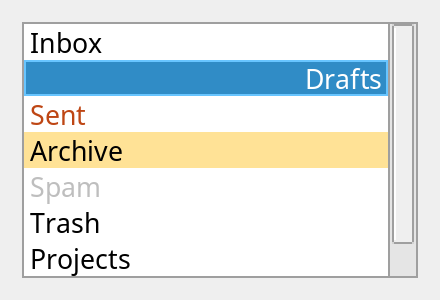
A list with a selected item, an item that is current, a colored item, one that is disabled, and a tool tip.
See also QListWidgetItem, QAbstractItemView and QComboBox.
Differences from Qt
There is no model and no QListView: the list keeps its items itself. There is no editing, no drag and drop, no icons and no icon or grid view mode, no setItemWidget(), no sorting while items are added (setSortingEnabled()), and no findItems(). Dragging does not select a range, and typing a letter looks at one letter at a time. The rows are as wide as the viewport and long text is elided, so the list has no horizontal scroll bar. The list scrolls by pixels. The first item added becomes the current item, as in Qt.
Member Function Documentation
QListWidget::QListWidget(QWidget *parent = nullptr)
Constructs an empty list with the given parent.
QListWidget::~QListWidget()
Destroys the list, and the items in it.
void QListWidget::addItem(QListWidgetItem *item)
Adds item at the end of the list, which takes it over.
See also insertItem().
void QListWidget::addItem(const QString &text)
This is an overloaded function.
Adds an item with the given text at the end of the list.
void QListWidget::addItems(const QStringList &labels)
Adds an item for each of the labels at the end of the list.
void QListWidget::changeEvent(QEvent *event)
Reimplements QAbstractItemView::changeEvent().
void QListWidget::clear()
Removes and deletes every item.
int QListWidget::count() const
Returns the number of items.
QListWidgetItem * QListWidget::currentItem() const
Returns the current item, or nullptr if there is none.
See also setCurrentItem() and currentRow().
void QListWidget::currentItemChanged(QListWidgetItem *current, QListWidgetItem *previous)
This signal is emitted when the current item changes from previous to current, either of which may be nullptr.
int QListWidget::currentRow() const
Returns the row of the current item, or -1 if there is none.
See also setCurrentRow().
void QListWidget::currentRowChanged(int currentRow)
This signal is emitted when the current row changes to currentRow, or -1 if there is none.
void QListWidget::currentTextChanged(const QString ¤tText)
This signal is emitted when the current item changes, with the currentText of the new one, which is empty if there is none.
void QListWidget::focusInEvent(QFocusEvent *event)
Reimplements QAbstractItemView::focusInEvent().
void QListWidget::focusOutEvent(QFocusEvent *event)
Reimplements QAbstractItemView::focusOutEvent().
void QListWidget::insertItem(int row, QListWidgetItem *item)
Inserts item at row, which is brought into the range 0 to count(); the items from row on move down. An item that is in another list or in this one moves.
See also addItem() and takeItem().
void QListWidget::insertItem(int row, const QString &text)
This is an overloaded function.
Inserts an item with the given text at row.
void QListWidget::insertItems(int row, const QStringList &labels)
Inserts an item for each of the labels at row.
QListWidgetItem * QListWidget::item(int row) const
Returns the item at row, or nullptr if there is none.
See also row().
void QListWidget::itemActivated(QListWidgetItem *item)
This signal is emitted when the user activates item: double-clicks it, or presses Return or Enter while it is the current item.
QListWidgetItem * QListWidget::itemAt(const QPoint &pos) const
Returns the item at pos, a position in the viewport, or nullptr if there is none.
See also visualItemRect().
QListWidgetItem * QListWidget::itemAt(int x, int y) const
This is an overloaded function.
Returns the item at (x, y) in the viewport.
void QListWidget::itemClicked(QListWidgetItem *item)
This signal is emitted when the user clicks item.
void QListWidget::itemDoubleClicked(QListWidgetItem *item)
This signal is emitted when the user double-clicks item.
void QListWidget::itemSelectionChanged()
This signal is emitted when the selection changes.
void QListWidget::keyPressEvent(QKeyEvent *event)
Reimplements QAbstractItemView::keyPressEvent().
The arrow keys, Page Up, Page Down, Home and End move the current item, skipping items that are not enabled; Space selects it, or toggles it in a list with MultiSelection or with Control in an ExtendedSelection list; Control+A selects all; Return and Enter activate it, and a letter goes to the next item that starts with it.
void QListWidget::mouseDoubleClickEvent(QMouseEvent *event)
Reimplements QAbstractItemView::mouseDoubleClickEvent().
void QListWidget::mousePressEvent(QMouseEvent *event)
Reimplements QAbstractItemView::mousePressEvent().
void QListWidget::mouseReleaseEvent(QMouseEvent *event)
Reimplements QAbstractItemView::mouseReleaseEvent().
void QListWidget::paintEvent(QPaintEvent *event)
Reimplements QAbstractItemView::paintEvent().
void QListWidget::resizeEvent(QResizeEvent *event)
Reimplements QAbstractItemView::resizeEvent().
int QListWidget::row(const QListWidgetItem *item) const
Returns the row of item, or -1 if it is not in this list.
See also item().
int QListWidget::rowHeight() const
Returns the height of every row: that of a line of text in the font of the list.
void QListWidget::scrollContentsBy(int dx, int dy)
Reimplements QAbstractItemView::scrollContentsBy().
void QListWidget::scrollToItem(const QListWidgetItem *item)
Scrolls the list so that item is in view. Does nothing if item is not in this list.
See also setCurrentItem().
void QListWidget::selectAll()
Selects all the items that can be selected, if the selection mode allows more than one selected item.
QList<QListWidgetItem *> QListWidget::selectedItems() const
Returns the selected items, in the order of the list.
void QListWidget::setCurrentItem(QListWidgetItem *item)
Makes item the current item, which selects it if the list allows that, and scrolls it into view. Does nothing if item is not in this list, or the user cannot make it current.
See also currentItem().
void QListWidget::setCurrentRow(int row)
Makes the item at row the current item, which selects it if the list allows that, and scrolls it into view. Does nothing if there is no such row, or the user cannot make it current.
See also currentRow().
void QListWidget::showEvent(QShowEvent *event)
Reimplements QAbstractItemView::showEvent().
void QListWidget::sortItems(Qt::SortOrder order = Qt::AscendingOrder)
Sorts the items by their text: from the smallest to the largest if order is Qt::AscendingOrder, otherwise the other way. Equal items keep their order. The current item stays the current item.
See also insertItem().
QListWidgetItem * QListWidget::takeItem(int row)
Removes the item at row from the list and returns it; the caller owns it. Returns nullptr if there is no such row. If it was the current item, the one that takes its place is.
See also insertItem().
bool QListWidget::viewportEvent(QEvent *event)
Reimplements QAbstractItemView::viewportEvent().
QRect QListWidget::visualItemRect(const QListWidgetItem *item) const
Returns the rectangle of item in the viewport, whether it is in view or not. It is empty if item is not in this list.
See also itemAt().