
QTabWidget Class
The QTabWidget class is a stack of pages with a row of tabs to choose the page. More…
| Header | #include <QTabWidget> |
|---|---|
| CMake | target_link_libraries(app PRIVATE Nt::Widgets) |
| Module | Nt Widgets C++ Classes |
| Inherits | QWidget |
List of all members, including inherited members
Public Functions
| QTabWidget(QWidget *parent = nullptr) | |
| ~QTabWidget() | |
| int | addTab(QWidget *page, const QString &label) |
| int | insertTab(int index, QWidget *page, const QString &label) |
| void | removeTab(int index) |
| void | clear() |
| int | count() const |
| int | currentIndex() const |
| QWidget * | currentWidget() const |
| QWidget * | widget(int index) const |
| int | indexOf(const QWidget *page) const |
| QString | tabText(int index) const |
| void | setTabText(int index, const QString &text) |
| bool | isTabEnabled(int index) const |
| void | setTabEnabled(int index, bool enabled) |
| QString | tabToolTip(int index) const |
| void | setTabToolTip(int index, const QString &tip) |
| bool | tabsClosable() const |
| void | setTabsClosable(bool closable) |
| bool | isMovable() const |
| void | setMovable(bool movable) |
| QTabBar * | tabBar() const |
Reimplemented Public Functions
| QSize | sizeHint() const |
| QSize | minimumSizeHint() const |
Public Slots
| void | setCurrentIndex(int index) |
| void | setCurrentWidget(QWidget *page) |
Signals
| void | currentChanged(int index) |
| void | tabCloseRequested(int index) |
| void | tabBarClicked(int index) |
| void | tabBarDoubleClicked(int index) |
Reimplemented Protected Functions
| void | paintEvent(QPaintEvent *event) |
| void | resizeEvent(QResizeEvent *event) |
| void | changeEvent(QEvent *event) |
Detailed Description
Each page is a widget, usually with a layout of its own, that is shown when its tab is current. The user clicks a tab, or uses the Left and Right keys when the tabs have the focus, to switch:
QTabWidget *tabs = new QTabWidget(window);
tabs->addTab(buttonsPage, "Buttons");
tabs->addTab(inputPage, "Input");
connect(tabs, &QTabWidget::currentChanged, [](int index) { qDebug() << index; });
The tab widget makes the pages its children and sizes them to fill the area below the tabs. It does not own them in any other way than a parent owns its children: a page that is removed with removeTab() is not deleted, and deleting a page removes its tab.
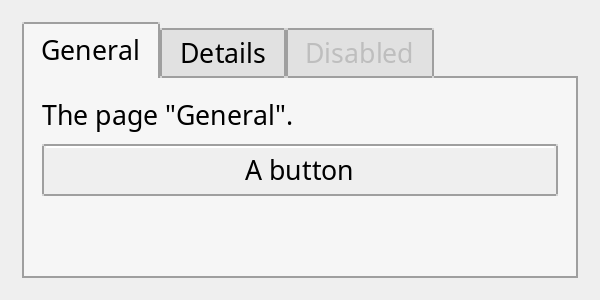
A tab widget with the first tab current and the last one disabled.
See also QGroupBox and QStyle.
Differences from Qt
The tabs are always above the pages: there is no setTabPosition(), setTabShape(), setDocumentMode(), tab icons, corner widgets (setCornerWidget()), setTabBar() or setUsesScrollButtons(); tabs that do not fit are cut off. Ctrl+Tab does not switch tabs. A change of the size hint of a page does not update the layout the tab widget is in.
Member Function Documentation
QTabWidget::QTabWidget(QWidget *parent = nullptr)
Constructs an empty tab widget with the given parent.
QTabWidget::~QTabWidget()
Destroys the tab widget and the pages.
int QTabWidget::addTab(QWidget *page, const QString &label)
Adds page as a tab with the text label, after the other tabs, and returns its index. The tab widget becomes the parent of page. The first tab that is added becomes the current one.
See also insertTab().
void QTabWidget::changeEvent(QEvent *event)
Reimplements QWidget::changeEvent().
void QTabWidget::clear()
Removes all tabs. The pages are hidden but not deleted.
See also removeTab().
int QTabWidget::count() const
Returns the number of tabs.
void QTabWidget::currentChanged(int index)
This signal is emitted when the current tab changes to the one at index, which is -1 if there are no tabs left.
int QTabWidget::currentIndex() const
Returns the index of the current tab, or -1 if there are none.
See also setCurrentIndex().
QWidget * QTabWidget::currentWidget() const
Returns the page of the current tab, or nullptr if there are none.
See also setCurrentWidget().
int QTabWidget::indexOf(const QWidget *page) const
Returns the index of the tab that has page, or -1 if there is none.
See also widget().
int QTabWidget::insertTab(int index, QWidget *page, const QString &label)
Inserts page as a tab with the text label at index, which is brought into the range of the tabs, and returns the index of the new tab. The tab widget becomes the parent of page. The current tab stays the same one, except that the first tab that is added becomes the current one.
See also addTab() and removeTab().
bool QTabWidget::isMovable() const
Returns whether the user can drag the tabs into another order. The default is false.
See also setMovable().
bool QTabWidget::isTabEnabled(int index) const
Returns whether the tab at index can be chosen. The tabs are enabled at first.
See also setTabEnabled().
QSize QTabWidget::minimumSizeHint() const
Reimplements QWidget::minimumSizeHint().
void QTabWidget::paintEvent(QPaintEvent *event)
Reimplements QWidget::paintEvent().
void QTabWidget::removeTab(int index)
Removes the tab at index. The page is hidden but not deleted, and stays a child of the tab widget. If the tab was the current one, a neighbouring tab becomes current.
See also clear() and insertTab().
void QTabWidget::resizeEvent(QResizeEvent *event)
Reimplements QWidget::resizeEvent().
void QTabWidget::setCurrentIndex(int index)
Makes the tab at index the current one and shows its page. An index that is not a tab is ignored. Emits currentChanged() if the tab changes.
See also currentIndex().
void QTabWidget::setCurrentWidget(QWidget *page)
Makes the tab of page the current one. Nothing happens if page is not in a tab.
See also currentWidget() and setCurrentIndex().
void QTabWidget::setMovable(bool movable)
Sets whether the user can drag the tabs into another order to movable. The pages move with their tabs.
void QTabWidget::setTabEnabled(int index, bool enabled)
Sets whether the tab at index can be chosen to enabled. A disabled tab is drawn grayed out and the user cannot switch to it. A tab that is current stays so.
See also isTabEnabled().
void QTabWidget::setTabsClosable(bool closable)
Sets whether the tabs have close buttons to closable. A click on one emits tabCloseRequested(); the tab widget does not remove the tab itself.
void QTabWidget::setTabText(int index, const QString &text)
Sets the text of the tab at index to text.
See also tabText().
void QTabWidget::setTabToolTip(int index, const QString &tip)
Sets the tool tip of the tab at index to tip.
QSize QTabWidget::sizeHint() const
Reimplements QWidget::sizeHint().
QTabBar * QTabWidget::tabBar() const
Returns the tab bar of the tab widget.
void QTabWidget::tabBarClicked(int index)
This signal is emitted when the user presses on the tab at index, or -1 for the empty part of the bar.
void QTabWidget::tabBarDoubleClicked(int index)
This signal is emitted when the user double-clicks the tab at index, or -1 for the empty part of the bar.
void QTabWidget::tabCloseRequested(int index)
This signal is emitted when the user clicks the close button of the tab at index.
bool QTabWidget::tabsClosable() const
Returns whether the tabs have close buttons. The default is false.
See also setTabsClosable() and tabCloseRequested().
QString QTabWidget::tabText(int index) const
Returns the text of the tab at index, or an empty string if there is no such tab.
See also setTabText().
QString QTabWidget::tabToolTip(int index) const
Returns the tool tip of the tab at index.
See also setTabToolTip().
QWidget * QTabWidget::widget(int index) const
Returns the page of the tab at index, or nullptr if there is no such tab.
See also indexOf().